Track follow-up tasks
In CTMS, you can view the meeting or event's follow-up in a dedicated interface to monitor the progress of tasks assigned during meetings or events. You can view task descriptions, assignees, due dates, and statuses to ensure responsibilities are clear and actions are completed on time, supporting accountability and smooth follow-through.
-
Access the study management page in one of the following ways:
-
In the CTMS application header, select the DASHBOARD tab and then select the study dashboard of your interest.
 Figure 1. Accessing study management from dashboard
-
In the CTMS application header, select the STUDY MANAGEMENT tab. Then from the Study Data List table, select the study name of your interest.
 Figure 2. Accessing study management from study data list
-
-
From the left pane, select Communication Management > Follow-up Tasks Tracking.
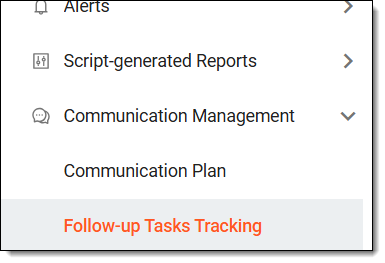 Figure 3. Accessing follow-up tasks
-
On the page that opens, locate the needed task, and select its meeting or event ID. Then do any of the following.
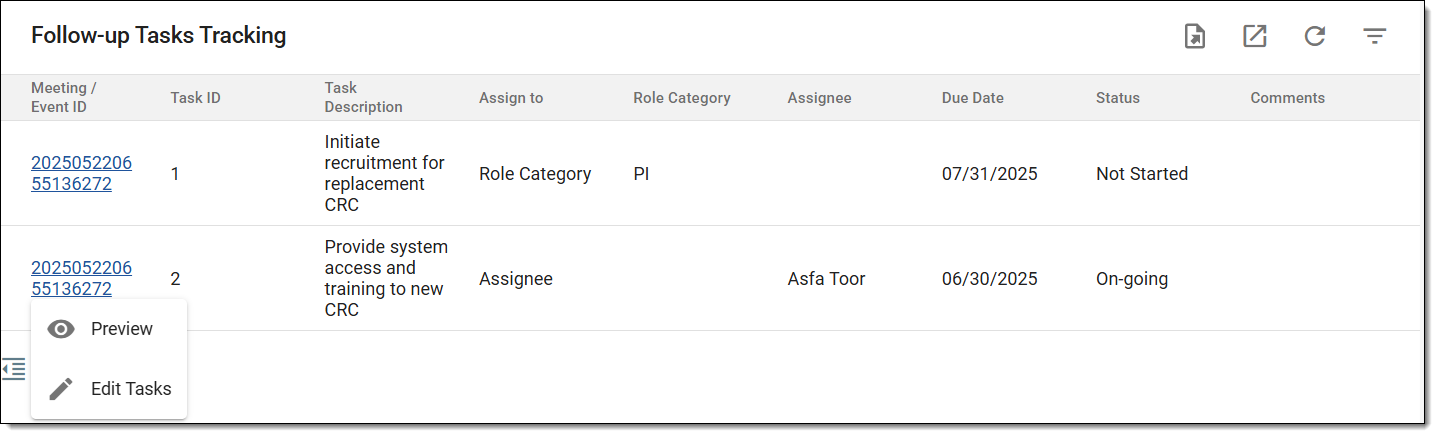 Figure 4. Managing follow-up tasks
If required, you can preview the meeting or event details by selecting Preview
 option, and on the page that opens,
analyze the meeting or event details as explained in the following table.
option, and on the page that opens,
analyze the meeting or event details as explained in the following table.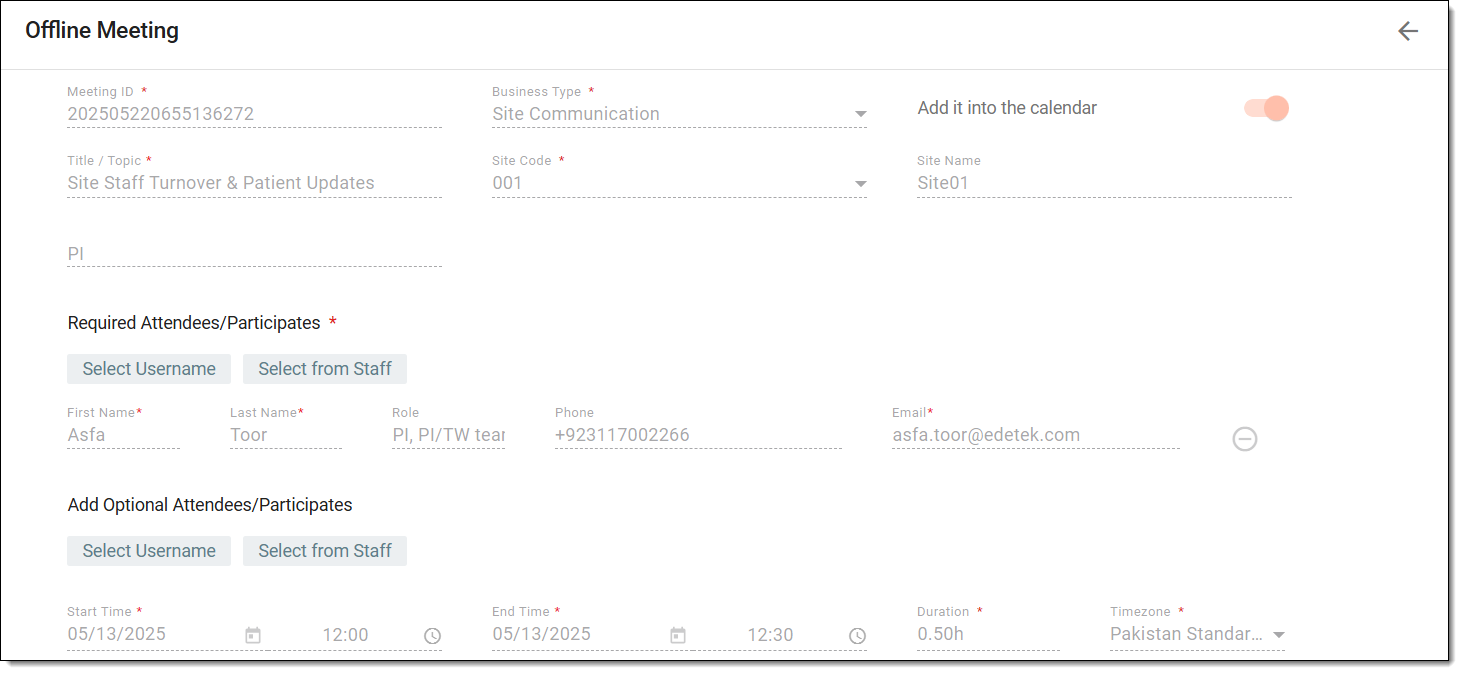 Figure 5. Previewing meeting
Element
Details
Business Type*
Represents the meeting or event's category or type.
Add it into the calendar
Represents whether the meeting or event is added to your calendar.
If the toggle is switched on, the scheduled meeting or event also appears in the calendar of the email account linked to your CONFORM profile. For example, if your registered email is a Microsoft account, the meeting will be visible in your Teams
                                        calendar.
Title / Topic*
Represents the title of the meeting or event to be discussed.
Site Code*
When the Business Type is Site Communication, then this field represents the code of the site related to the meeting or event.
Site Name
Represents the autopopulated name of the site.
PI
Represents the autopopulated name of the site's PI.
Required Attendees/Participants*
Represents the participants who are required to attend the scheduled meeting or event and their associated details like, name, role, phone number, and email.
Add Optional Attendees/Participants
Represents the optional participants of the scheduled meeting or event and their associated details like, name, role, phone number, and email.
Start Time*
Represents the date and time the meeting or event begins.
End Time*
Represents the date and time the meeting or event ends.
Duration*
Represents the total meeting or event duration.
Timezone*
Represents the meeting or event's time zone.
Periodical
Indicates if the meeting recurs periodically.
For example, if the meeting needs to be conducted weekly or monthly, this setting ensures that the meeting is scheduled to occur at those intervals instead of being a one-time event.
Frequency
If it is a recurring meeting or event, that is Yes is selected in the previous field, then this field specifies when the meeting or event is expected to recur:
Communication Method*
Indicates either Phone or Email as the communication method.
Location*
Represents the meeting or event location.
Agenda
Displays the meeting or event's discussion points or objectives.
Upload Files
Displays any uploaded and attached material or documents to review or discuss in the meeting.
-
In the Task List table that appears, the task row is now editable, enter the details as explained in the following table.
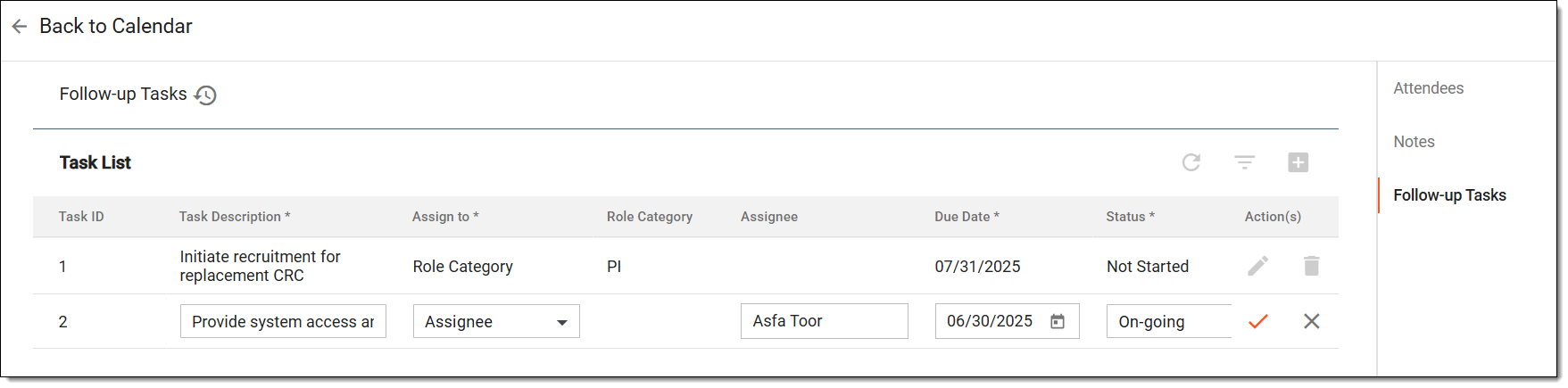 Figure 6. Updating follow-up task
Tip
In the following table, mandatory elements are marked with an asterisk (*).
Element
Details
Task ID
Represents the system-generated sequential number to uniquely identify each task in the list. It is automatically assigned and not editable by the user.
Task Description*
Enter a short summary of the task that needs to be completed.
Assign to*
Select the Role Category or Assignee option to choose the personnel responsible for the task.
Role Category
If you have chosen Role Category in the previous field, then here select the role (PI, CRC, CRA, and so on) that must complete the task.
Assignee
If you have chosen Assignee in the Assign to field, then here select the personnel who is responsible for completing the task.
Due Date*
Select the deadline by which the task should be completed.
Status*
Select the current progress of the task: Not started, On-going, or Completed.
Save
Select
 to update the task.
Cancel
Select
 to dismiss your changes without saving.
-
Once you have previewed the required details and saved your updates, the task is managed.