Review CRF version history
In SD, under the Version History subtab, you can review the complete record of all significant changes made to a certain CRF version. This helps with traceability and enhances control over the CRF design changes.
-
In the Study Designer application header, select the CONFIGURATION tab.
-
From the left pane, select the Version History subtab.
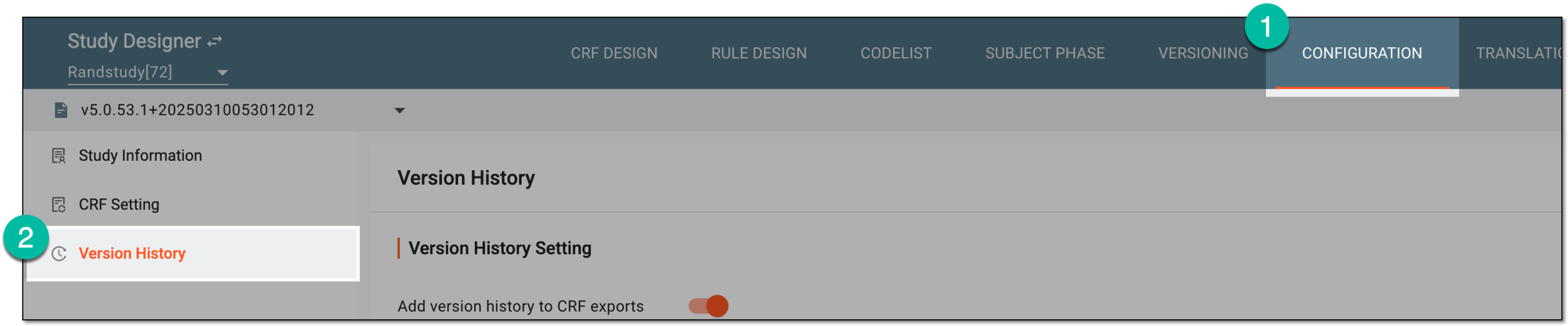 Figure 1. Accessing CRF version history
-
On the Version History page, in the Version History Details block, review the record of significant changes as explained in the following table.
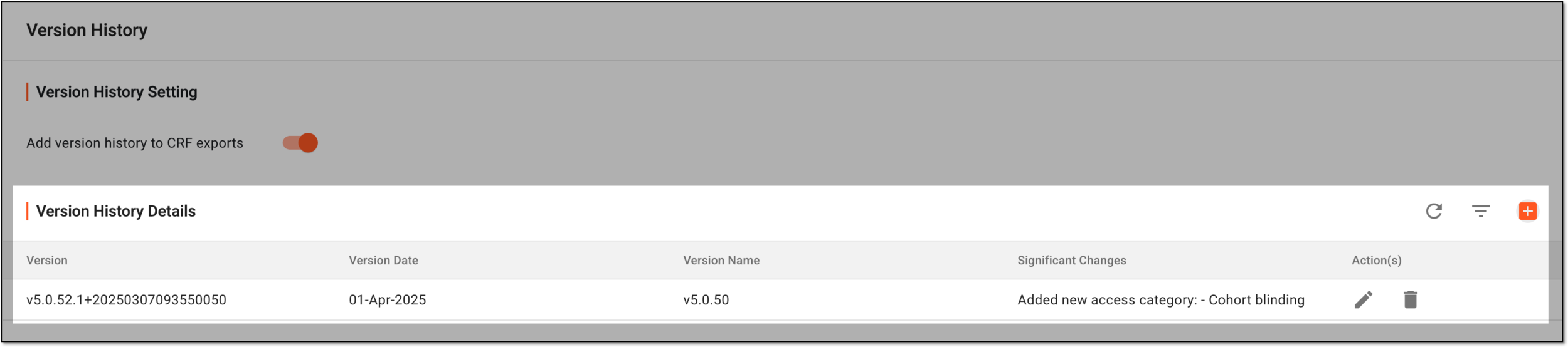 Figure 2. Reviewing CRF version history
Column
Details
Version
Represents the unique identifier of the CRF version in the eClinical system.
Only one record can exist for every CRF version.Version Date
Represents the custom date entered by the user upon adding the significant changes record to version history to outline when these changes were introduced to the CRF version.
This date has no system logic and only exists in the Version History Details table for user convenience in distinguishing between versions.Version Name
Represents the custom name of the CRF version entered manually by the user upon adding the significant changes record to version history.
This name has no system logic and only exists in the Version History Details table for user convenience in distinguishing between versions.Significant Changes
Represents the summary of significant changes made to the CRF design that initiated the creation of the new version.
You have reviewed the complete history of CRF version changes.