Activate/Inactivate external recipient account
By maintaining the recipient list, you can create a contact sheet of people who are not necessarily eClinical system users, thus enabling external parties to become recipients of system notifications—various alerts or site and depot shipment notices. Whenever some contacts are temporarily unavailable, you can inactivate their account, thus ceasing system notification for them until they are activated again.
-
In the IWRS application header, select the ALERT tab.
-
On the page that opens, from the left pane, select External Recipient.
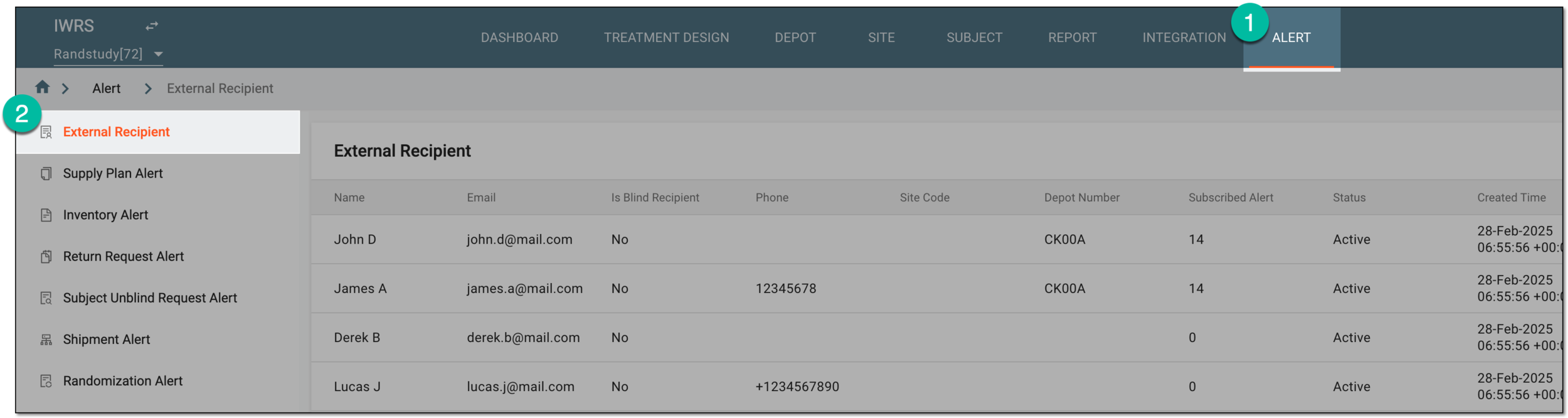 Figure 1. Accessing external recipient list
-
On the External Recipient page that opens, locate the recipient's account that needs to be activated or deactivated. Then from the Action(s) column next to the account, select Activate
 or Inactivate
  , respectively.
 Figure 2. Activating or inactivating external recipient account
Once selected, the account becomes active or inactive. Inactive accounts stop receiving any system notification and cannot be selected as recipients for alerts.