Analyze workflow-sent email report
In EDC, workflows are intended to dictate the procedure of the source document and payment request handling, introducing an additional tier of scrutiny and the approval or rejection mechanism to reduce the risk of unintended impact on sensitive resources and financial operations.
When creating a new workflow, you add all the relevant stages of the process and assign users responsible for completing each stage. To notify the user of the required workflow stage completion, the system sends out notification emails.
For traceability, you can review the complete history of emails sent by workflows via one comprehensive report.
-
In the EDC application header, select the STUDY INFO tab.
-
On the page that opens, from the left pane, select Workflow > Sent Emails by Workflow.
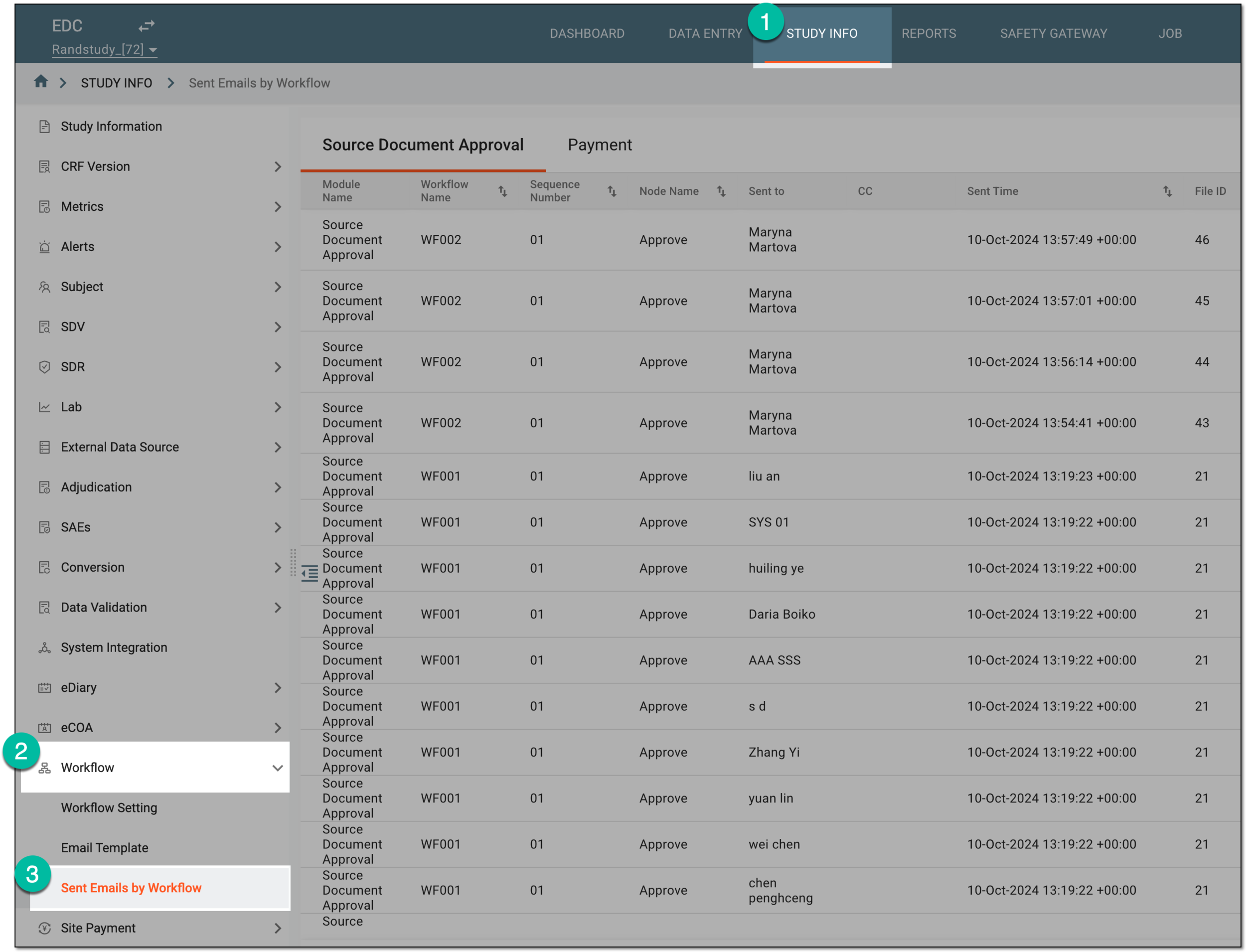 Figure 1. Accessing workflow-sent email list
-
On the page that opens, switch between available tabs to review the details of mailing history for different workflow types as follows.
Under the Source Document Approval tab, review the details of mailing history as explained in the following table.
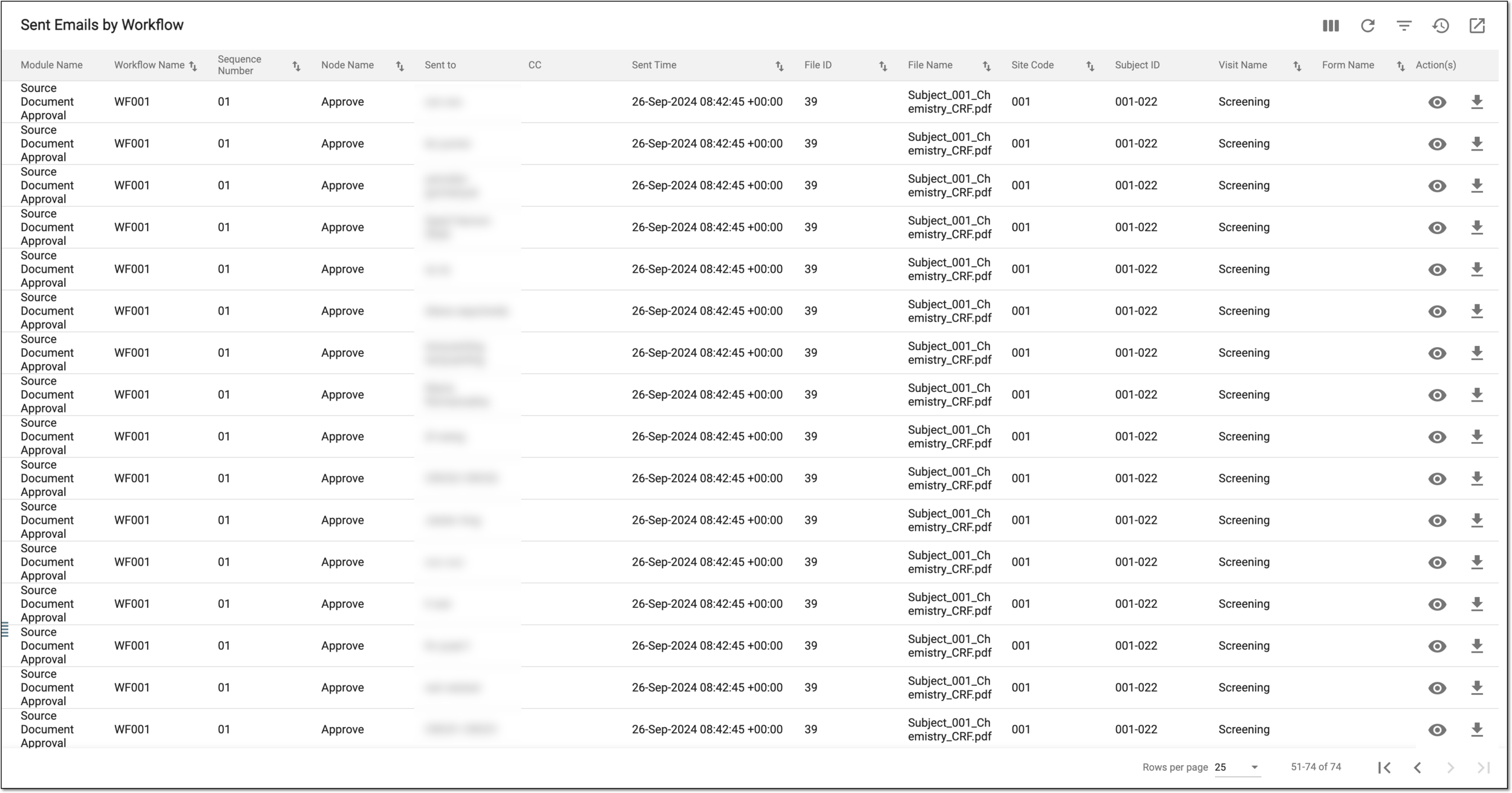 Figure 2. Viewing workflow-sent email list for source document approval
Column
Details
Module Name
Represents the name of the workflow type for which the email is sent, such as Source Document Approval.
Workflow Name
Represents the name of the workflow according to the execution of which the email is sent.
Sequence Number
Represents the sequential number of the sent email.
Node Name
Represents the name of the workflow stage (node) according to the execution of which the email is sent. For instance, Approve, Sign, or else.
Sent to
Represents the name of the user who is the recipient of the email.
CC
Represents the name of the user who received a copy of the original email.
Sent Time
Represents the date, time, and time zone indicator of when the email is sent.
File ID
Represents the system-assigned unique identification number of the source document for which the workflow execution is triggered resulting in sending the email.
File Name
Represents the name of the source document for which the workflow execution is triggered resulting in sending the email.
Site Code
Represents the unique identifier of the site that collected the source document for which the workflow execution is triggered resulting in sending the email.
Subject ID
Represents the unique identifier of the subject for whom the site collected the source document that initiated the workflow and resulted in sending the email.
Visit Name
Represents the name of the subject visit at which the site collected the source document for which the workflow execution is triggered resulting in sending the email.
Form Name
Represents the name of the CRF for which the site collected the source document that initiated the workflow resulting in sending the email.
Under the Payment tab, review the details of mailing history as explained in the following table.
 Figure 3. Viewing workflow-sent email list for payment request approval
Column
Details
Module Name
Represents the name of the workflow type for which the email is sent, such as Payment.
Workflow Name
Represents the name of the workflow according to the execution of which the email is sent.
Request ID
Represents the identification number of the payment request for which the email is sent.
Sequence Number
Represents the sequential number of the sent email.
Node Name
Represents the name of the workflow stage (node) according to the execution of which the email is sent. For instance, Approve, Sign, or else.
Sent to
Represents the name of the user who is the recipient of the email.
CC
Represents the name of the user who received a copy of the original email.
Sent Time
Represents the date, time, and time zone indicator of when the email is sent.
Site Code
Represents the unique identifier of the site whose payment request workflow execution has triggered the email.
You have analyzed the history of workflow-sent emails for source documents and payment requests.
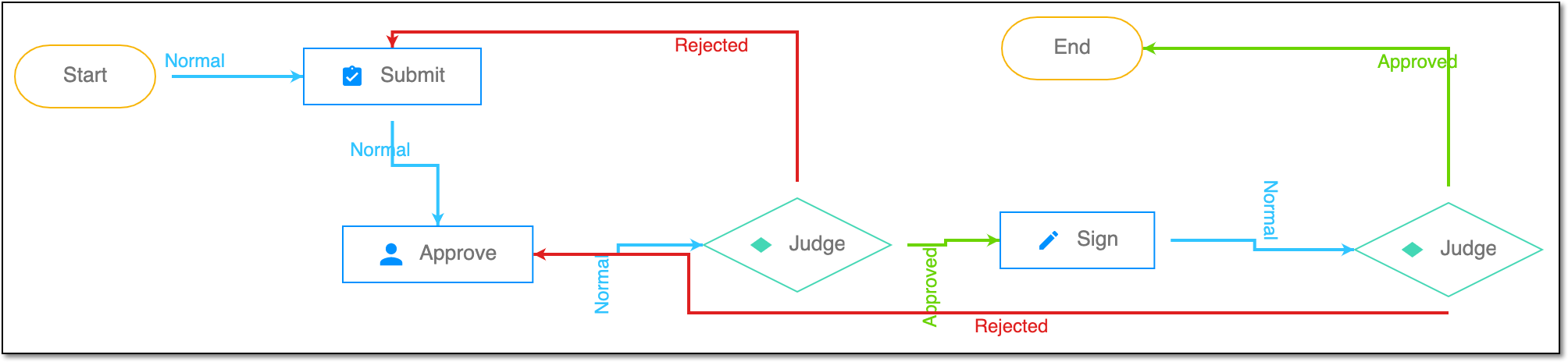
A schema, each step of which represents a stage of a specific entity lifecycle in the system.
A workflow can be considered an instrument to help control various actions on system entities for the sake of accountability, as it limits the actions that can be performed on the entity associated with a workflow. This provides an additional tier of scrutiny, and the approval/rejection mechanism reduces the risk of unintended impact on sensitive resources and important information.
 |
For instance, in eTMF, the workflow dictates the procedure of file and folder management from the moment of upload to the approval stage; in CTMS, the workflow controls the process of creation, completion, and approval of a trip report; in EDC, the workflow covers the process of source document handling.
A specialized document in a clinical trial designed to collect the subject data.
See also eCRF.