Add external system account
An external system is referred to as an application, platform, or service that interacts with the eClinical system to provide specialized facilities such as data exchange to improve the workflows of eClinical trials. The external system needs to be connected with the eClinical system for communication and exchange of data flow. To connect the external system to an eClinical system, the administrators need to establish an account.
In this section, you can learn how to add an external system account for interaction with the eClinical system.
-
In the ADMIN application header, select the CONFIGURATION tab.
-
On the page that appears, from the left pane, select Integration Account > External System Account.
-
On the External System Account page that appears, from the workspace toolbar, select New Item
 .
. -
In the New dialog that appears, fill in the fields as explained in the following table.
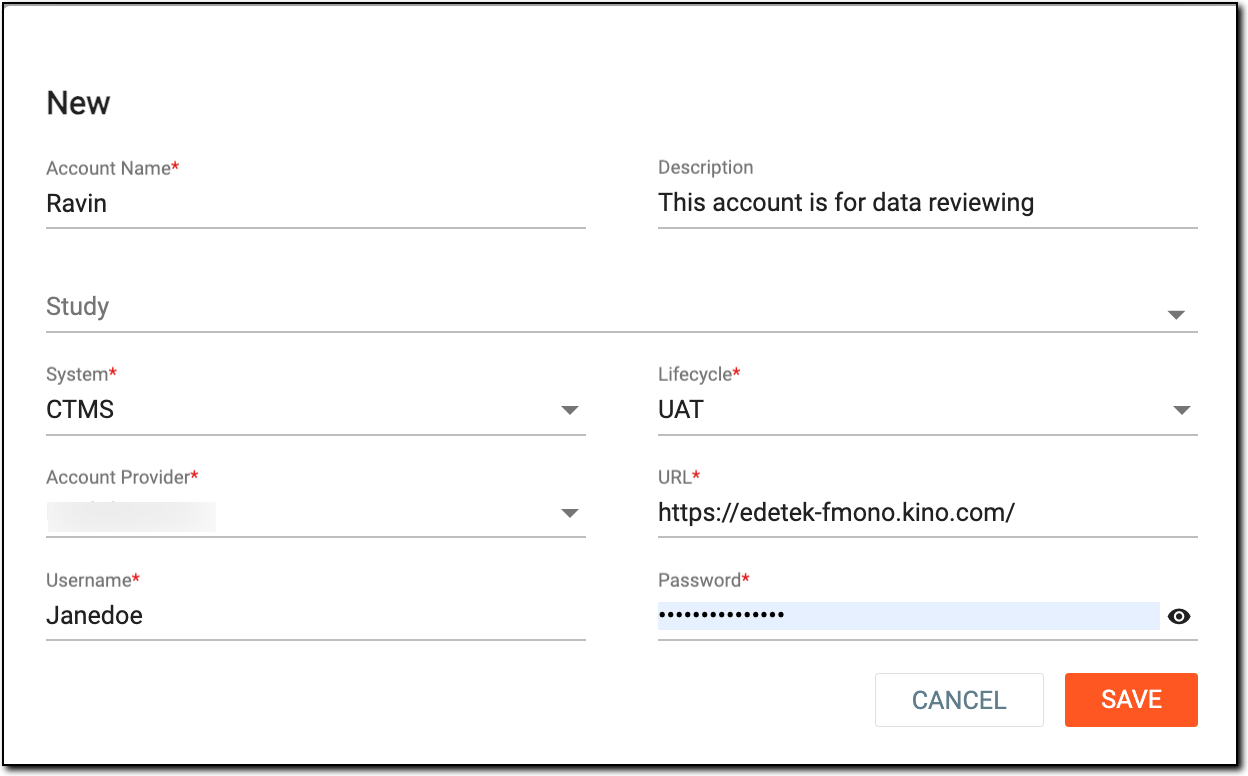 Figure 1. Adding new external system account
Tip
In the following table, mandatory elements are marked with an asterisk (*).
Element
Details
Account Name*
Enter a meaningful name for the account.
Description
Enter some brief information about the account, for instance, the account is used for monitoring purposes.
Study
From the dropdown list, select the study of a particular application to connect it to the external system account.
System*
From the dropdown list, select the application of the eClinical system—for instance, IWRS—to connect it to the external system account.
Lifecycle*
From the dropdown list, select the stage at which the account is created, for instance, DEV.
Account Provider*
Enter the name of the external system that is being associated with the eClinical system via the account you create.
URL*
Enter the web address that contains the location where the external system account interacts with the eClinical system.
Username*
Enter the login name of the user who is creating the external system account.
Password*
Enter the password of the user who is creating the external system account.
SAVE
Select
 to create the external system account.
CANCEL
Select
 to dismiss without making any changes.
Once saved, a new external system account is created. Now you can login and use this system to push the data from the EDC application to perform job management.