Activate/Inactivate identity provider
An identity provider centralizes the SSO authentication, moreover, it manages the user authentication. An added identity provider can be activated or inactivated. Activating the identity provider enables the SSO authentication of the users. Inactivating an identity provider restricts the user's authentication and also disables their SSO functionality. Inactivating an identity provider assists in disabling the authentication temporarily if it is no longer requested by the client.
-
In the ADMIN application header, select the CONFIGURATION tab.
-
In the left pane of the page that appears, select Single Sign-On > IDPs.
-
On the Identity Provider table that appears, next to the needed identity provider, select either of the following:
-
Activate
 : select this icon to activate the identity provider. The SSO is enabled and all the users added to the
activated identity provider are authenticated.
: select this icon to activate the identity provider. The SSO is enabled and all the users added to the
activated identity provider are authenticated. -
Inactivate
 : select this icon to inactivate the identity provider. The SSO is disabled and all the users added to
the inactivated identity provider have disabled authentication.
: select this icon to inactivate the identity provider. The SSO is disabled and all the users added to
the inactivated identity provider have disabled authentication.
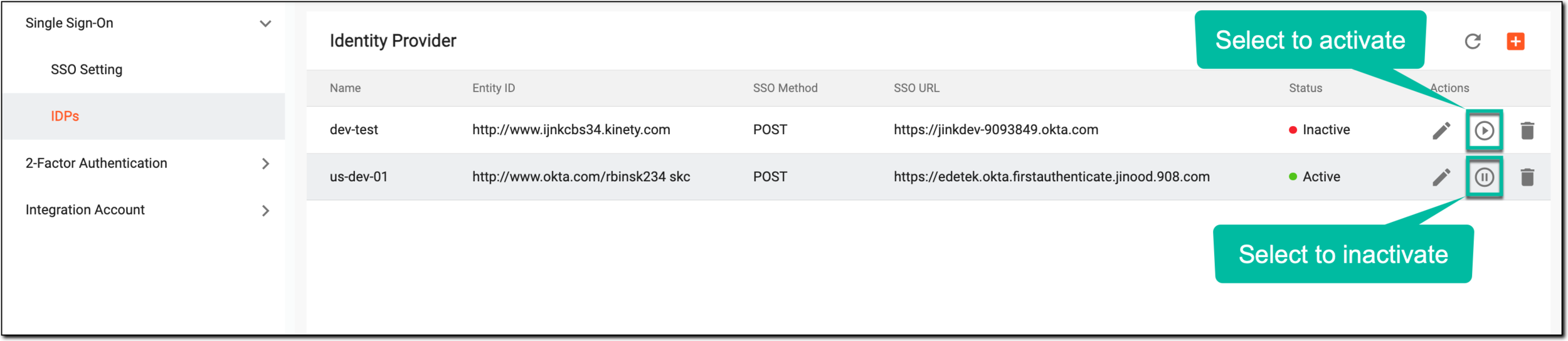 Figure 1. Activating/Inactivating identity provider
-
Once completed, the identity provider is activated or inactivated depending upon the action performed.