Subject return progress
In IWRS, the DASHBOARD tab provides you with multiple charts to get a summary of IWRS data and processes. The Subject Return Progress bar chart provides you with the percentage and total count of items that are to be returned or not returned by the subject. When the subject comes to the site with an extra number of items, these items are returned by the subject to be utilized accordingly.
The information in this chart is updated in real-time, that is as soon as a new item unit added is set to be returned or not returned by the subject the chart is updated.
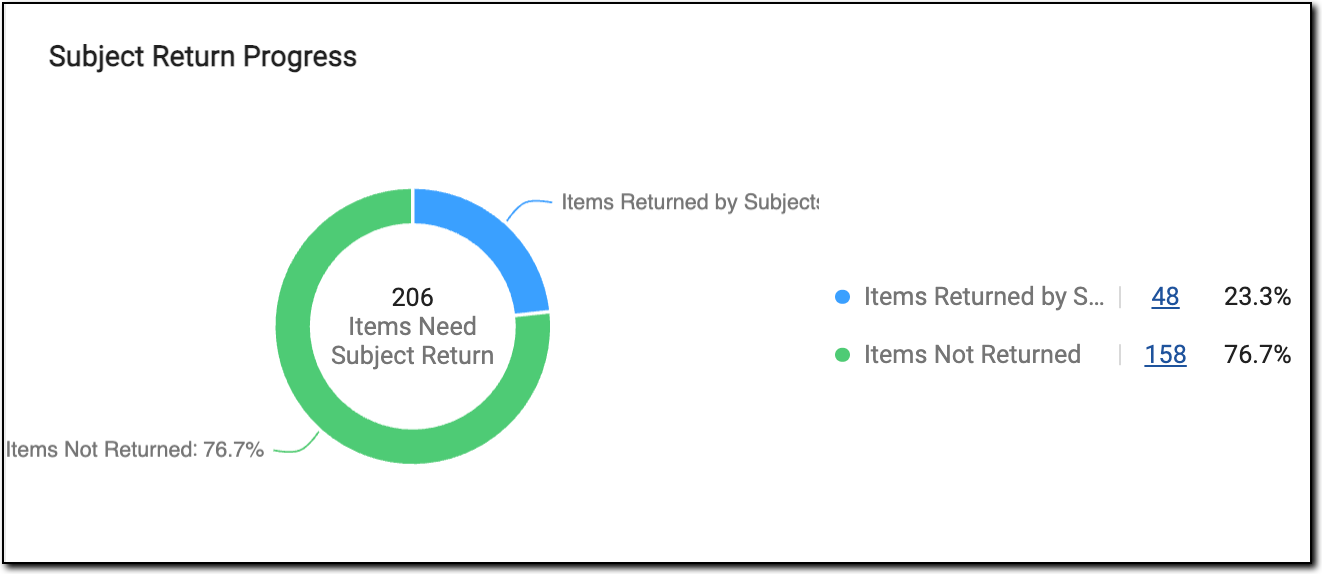 |
In the preceding figure, the green color depicts the percentage and number of items not returned by subjects and the blue color depicts the number and percentage of items needed to return to the subject. Selecting the count hyperlink it redirects to the subject item accountability report with the filters applied.
Important
If a depot is selected, then this chart does not appear on the Inventory dashboard, this chart only appears when a site is selected, or no depot/site is selected.