Add human resource
A human resource refers to the monitoring staff who is responsible for the execution of activities during site monitoring visits. It is mandatory to add human resources after creating a monitoring plan for a specific site or sites. Once added, this human resource is automatically assigned as a responsible monitor for all monitoring visits generated based on a corresponding monitoring plan.
-
Access the study management page in one of the following ways:
-
In the CTMS application header, select the DASHBOARD tab and then select the study dashboard of your interest.
 Figure 1. Accessing study management from dashboard
-
In the CTMS application header, select the STUDY MANAGEMENT tab. Then from the Study Data List table, select the study name of your interest.
 Figure 2. Accessing study management from study data list
-
-
On the study page that opens, in the left pane, expand Monitoring and select Monitoring Plan.
-
On the page that opens, select the Human Resource tab.
-
Above the Human Resource table that appears, on the workspace toolbar, select New Item
 .
.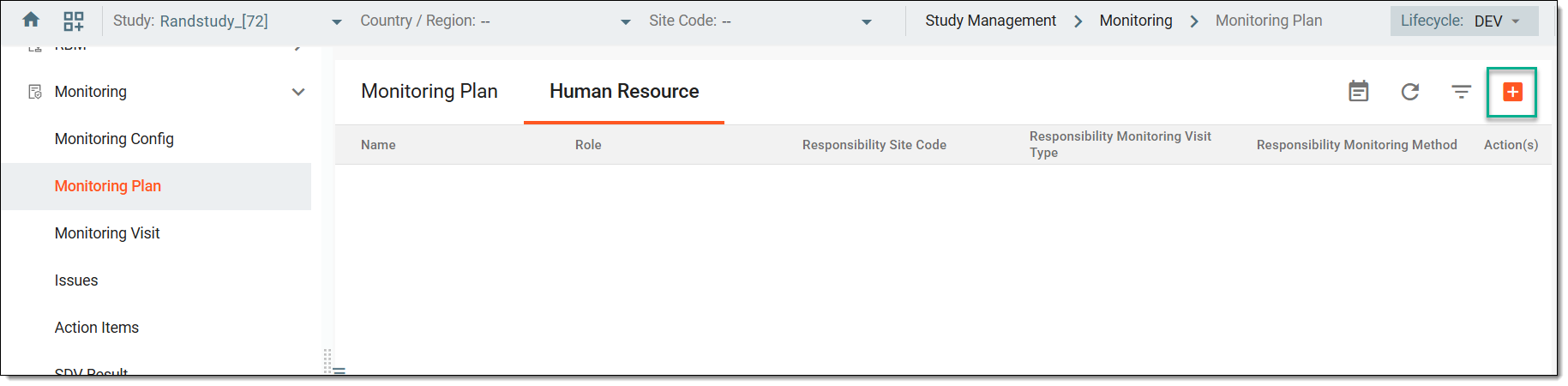 Figure 3. Accessing option to add human resource
-
In the dialog that appears, fill in the fields as suggested in the following table.
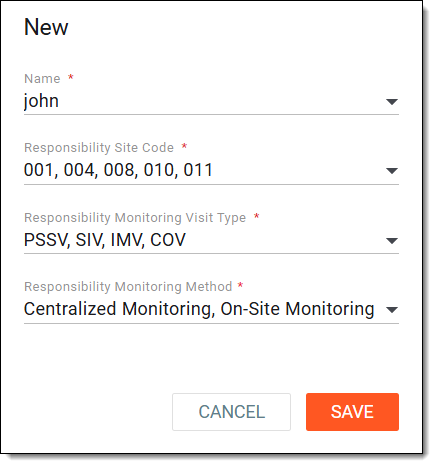 Figure 4. Adding human resource
Tip
In the following table, mandatory elements are marked with an asterisk (*).
Element
Details
Name*
Select a user who has a collection of roles assigned to them. The selected user becomes the responsible monitor for all monitoring visits that are generated based on the previously created monitoring plan entities.
Responsibility Site Code*
Select a site or sites for which the added human resource is to be responsible. The monitoring visit becomes generated for the previously selected monitor if the monitoring plan meets these criteria.
Responsibility Monitoring Visit Type*
Select monitoring types for which the added human resource is to be responsible. The monitoring visit becomes generated for the previously selected monitor if the monitoring plan meets these criteria.
Responsibility Monitoring Method*
Select monitoring methods for which the added human resource is to be responsible. The monitoring visit becomes generated for the previously selected monitor if the monitoring plan meets these criteria.
SAVE
Select
 to confirm the human resource creation.
CANCEL
Select
 to cancel the human resource creation.
Once saved, a new human resource is added. You can now proceed to creating a monitoring visit.