Delete monitoring configuration
The monitoring configuration incorporates a group of settings that facilitate the preparation and management of monitoring visits. You can delete monitoring configuration entities that are no longer required and will not be used for designing new monitoring visits. Note that you cannot delete monitoring configuration entities with the Active status.
-
Access the study management page in one of the following ways:
-
In the CTMS application header, select the DASHBOARD tab and then select the study dashboard of your interest.
 Figure 1. Accessing study management from dashboard
-
In the CTMS application header, select the STUDY MANAGEMENT tab. Then from the Study Data List table, select the study name of your interest.
 Figure 2. Accessing study management from study data list
-
-
On the study page that opens, in the left pane, expand Monitoring and select Monitoring Config.
-
In the Monitoring Configuration table that appears, next to the inactive monitoring configuration entity, select More
 > Delete
  .
.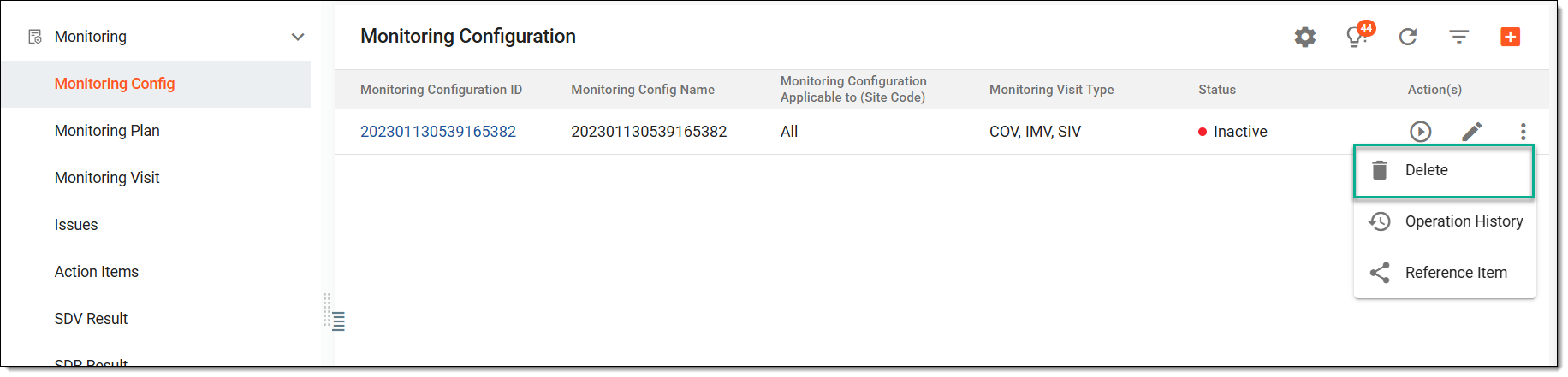 Figure 3. Deleting monitoring configuration
-
In the Reason dialog that opens, enter the reason why the monitoring configuration entity is being deleted from the system and then select
 .
.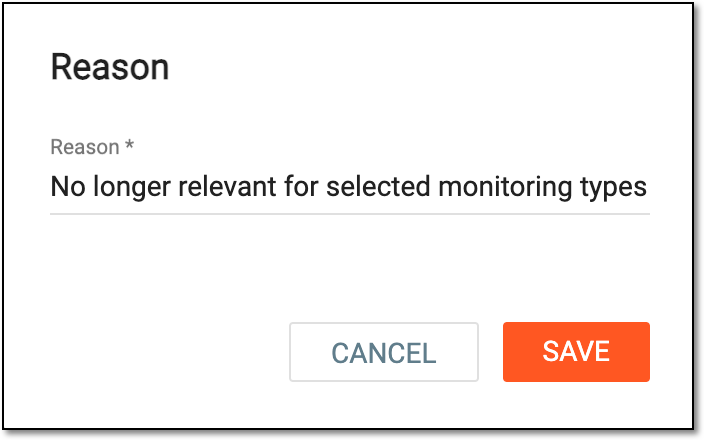 Figure 4. Providing reason for deletion
Once confirmed, the monitoring configuration is deleted.