View investigational products added to CTMS
All investigational products added to the CTMS system are displayed in the Investigational Product table.
-
In the CTMS application header, select the ENTITY MANAGEMENT tab.
-
On the page that opens, in the left pane, select Investigational Product.
-
On the Investigational Product page that opens, in the table, view all the investigational products added to the CTMS system.
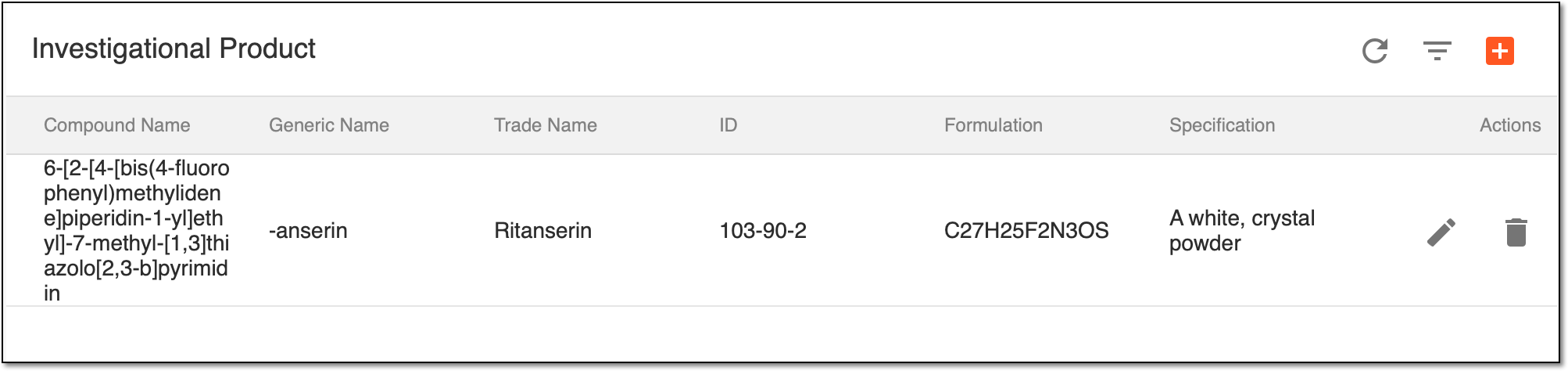 Figure 1. Observing investigational products added to CTMS
Element
Details
Compound Name
Represents the chemical name of the investigational product.
Ideally, this is the name from which a unique structural formula can be created.
Generic Name
Represents the generic or nonproprietary name of the investigational product.
This name is intended to provide a unique standard name for each active ingredient of the investigational product to avoid prescribing errors.
Trade Name
Represents the brand name of the investigational product.
ID
Represents the unique ID number of the investigational product registered within the CTMS system.
Formulation
Represents the molecular formula of the investigational product.
Specification
Represents all the critical product substance attributes that affect the manufacturing and quality of the investigational product.
Pharmaceutical Company
Represents the name of the company manufacturing the investigational product.