Setup selective SAE report manually
The serious adverse event (SAE) report presents a comprehensive picture of the circumstances leading to the SAE, the after-effects, and other relevant details.
In the EDC application, the SAE report can be generated and attached as a file to the alert email that is sent upon the SAE occurrence. In EDC, you can also set up the format of the SAE report by selecting one of the following options:
-
Full SAE PDF Report: to generate a complete SAE report in PDF that includes all the related visits, forms, and variables data recorded in the EDC system.
-
Simplified SAE Word Report: to manually set up a selective set of the related visits, forms, and variables data that must be included in the report of the DOC format.
-
In the EDC application header, select the STUDY INFO tab.
-
On the page that opens, in the left pane, select SAE > SAE Report Setting.
-
On the SAE Report Setting page that opens, select the Simplified SAE Word Report option.
-
In the form that appears, next to each category of forms and variables, select New SAE Field
 to add a new row of data. In the
form, select the variables to map with the relevant report fields as explained in the following table.
to add a new row of data. In the
form, select the variables to map with the relevant report fields as explained in the following table.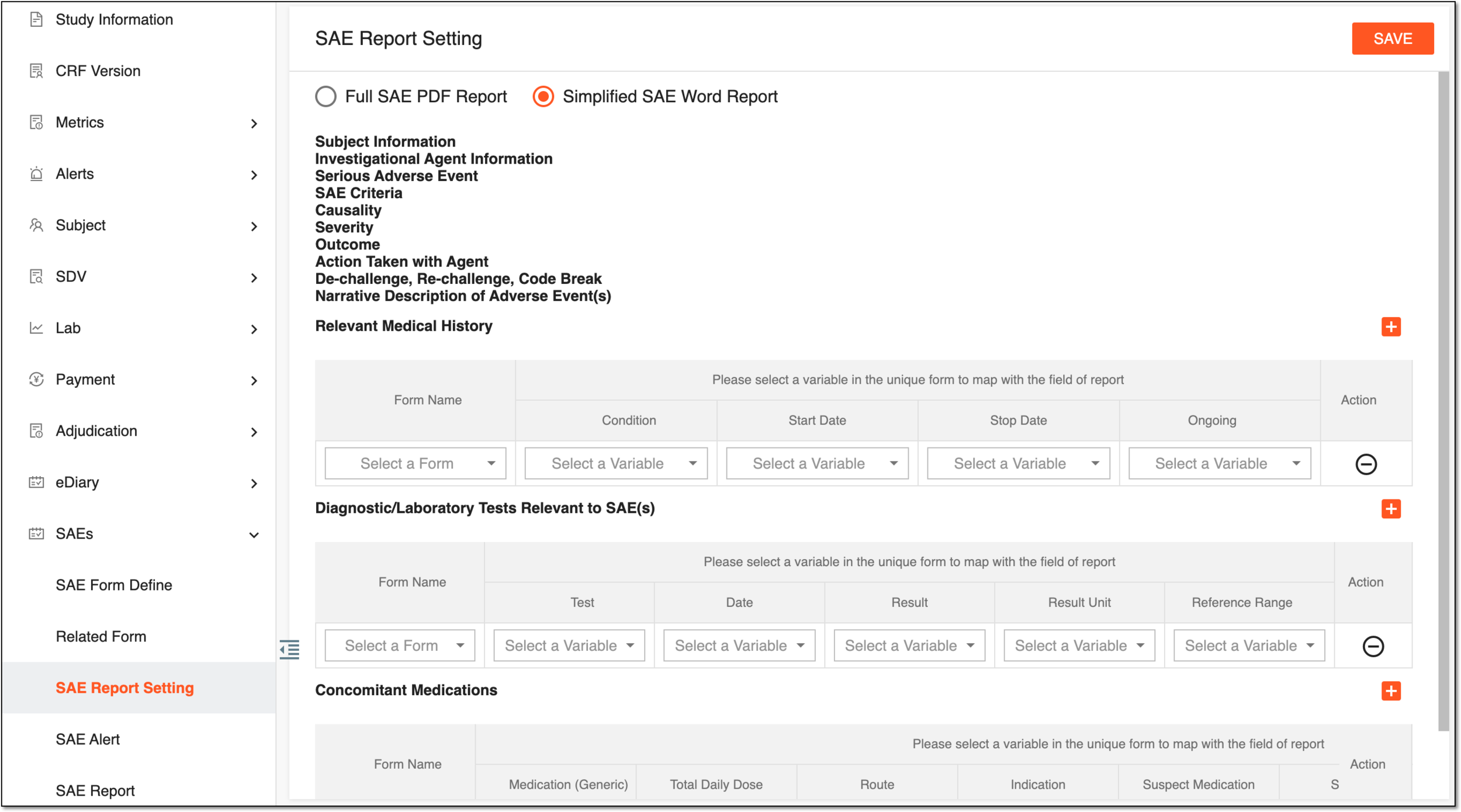 Figure 1. Setting simplified SAE report fields
Element
Details
Relevant Medical History
Form Name
Select the form representing the subject's medical history the variables from which you want to map with the respective fields of the SAE report.
Condition
Select the variable representing the subject's condition from his medical history.
Start Date
Select the variable representing the starting date of the subject's medical condition.
Stop Date
Select the variable representing the stopping date of the subject's medical condition.
Diagnostic/Laboratory Tests Relevant to SAE(s)
Form Name
Select the form representing the laboratory or other test results that are related to the SAE occurrence and the variables from which you want to map with the respective fields of the SAE report.
Test
Select the variable representing the test that has been held to assess the subject's medical condition related to the SAE.
Date
Select the variable representing the date when the test has been held.
Result
Select the variable representing the result of the taken test.
Result Unit
Select the variable representing the unit in which the test result is measured.
Reference Range
Select the variable representing the range of upper and lower values that serves to assess if the test result is within the permissible levels.
Concomitant Medications
Form Name
Select the form representing the information on any concomitant medications the subject is taking while participating in a clinical trial.
Medication (Generic)
Select the variable representing the name of the concomitant medication the subject is taking while participating in a clinical trial.
Total Daily Dose
Select the variable representing the dose of the concomitant medication the subject is taking daily while participating in a clinical trial.
Route
Select the variable representing the route of concomitant medication the subject is taking while participating in a clinical trial, for example, oral or intravenous.
Indication
Select the variable representing the indication of the SAE occurrence, for example, high fever, high/low blood pressure, projectile vomiting, or else.
Suspect Medication
Select the variable representing the name of the concomitant medication the subject is taking while participating in a clinical trial suspected to cause the SAE.
Start Date
Select the variable representing the start date of the SAE occurrence tracking.
Stop Date
Select the variable representing the end date of the SAE occurrence tracking.
Ongoing
Select the variable representing that the SAE occurrence tracking is ongoing.
-
On the top right of the SAE Report Setting page, select
 to save the implemented changes.
Upon saving, the settings are saved. These settings determine what information is added to the SAE report.