Activate/Inactivate study site
A site is a medical facility or a research center where the study is conducted. In the CTMS application, a list of sites in various countries that belong to a specific study can be viewed on a separate page. You can deactivate some sites if they no longer need to be a part of the study. If the study requirements change and the site needs to be available again, you can activate it back.
Important
Note that you can activate or inactivate sites only if the study, its country, or such sites have not been previously closed, terminated, or suspended.
-
Access the study management page in one of the following ways:
-
In the CTMS application header, select the DASHBOARD tab and then select the study dashboard of your interest.
 Figure 1. Accessing study management from dashboard
-
In the CTMS application header, select the STUDY MANAGEMENT tab. Then from the Study Data List table, select the study name of your interest.
 Figure 2. Accessing study management from study data list
-
-
From the left pane of the study page that opens, select Study Details > Site List.
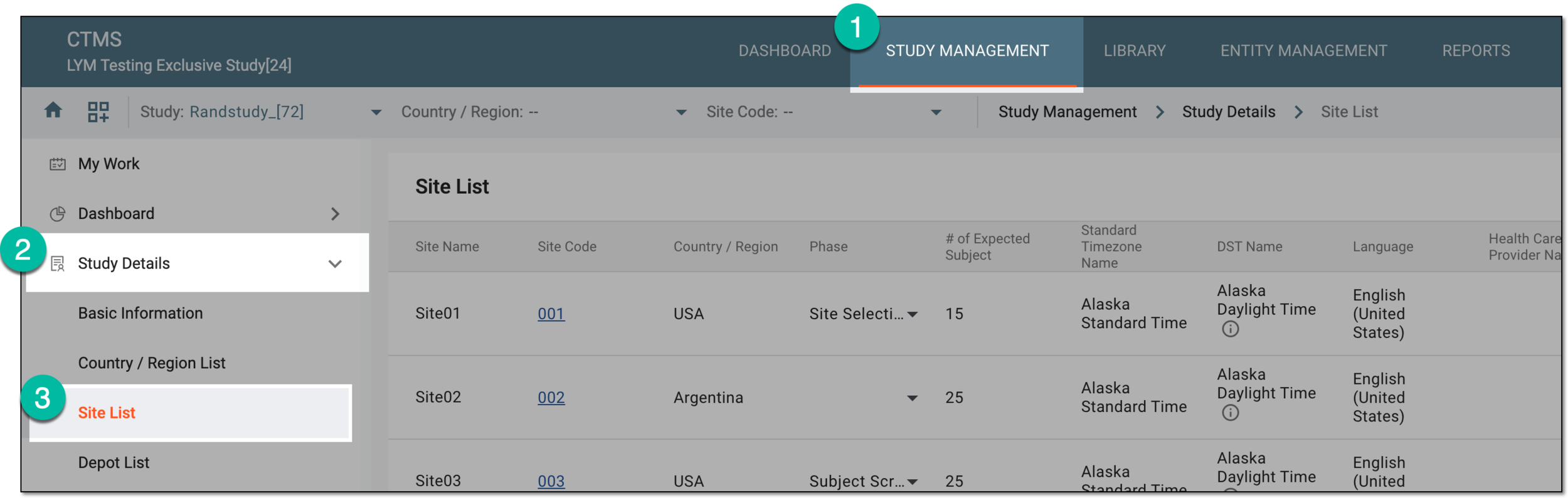 Figure 3. Accessing study sites
-
In the Site List table that appears, select Activate
 next to the inactive site to
activate it. Or select Inactivate
next to the inactive site to
activate it. Or select Inactivate  next to the active site to inactivate it.
 Figure 4. Activating or inactivating site
-
If you have selected to inactivate a site, in the Reason confirmation dialog that appears, select one of the reasons for site inactivation. If the Other reason is selected, you need to specify the reason manually in the Details field that becomes available. Then select SAVE.
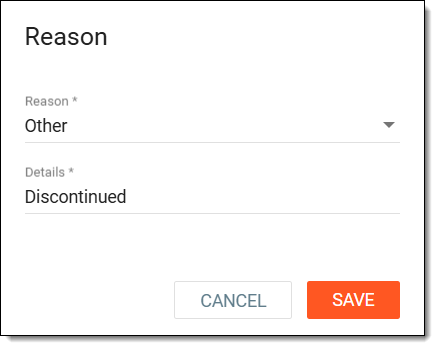 Figure 5. Entering reason to inactivate site
Once done, the site is activated or inactivated.