Analyze process tracking data
The Process tracking dashboard provides comprehensive insight into the study's milestones and placeholders, representing details such as total count, completion rate, and others at the study, country, and site levels.
To analyze the process tracking data
-
In the eTMF application header, select the TMF tab.
-
On the page that opens, in the left pane, select the Study List subtab.
-
In the Study List table, select the needed study name.
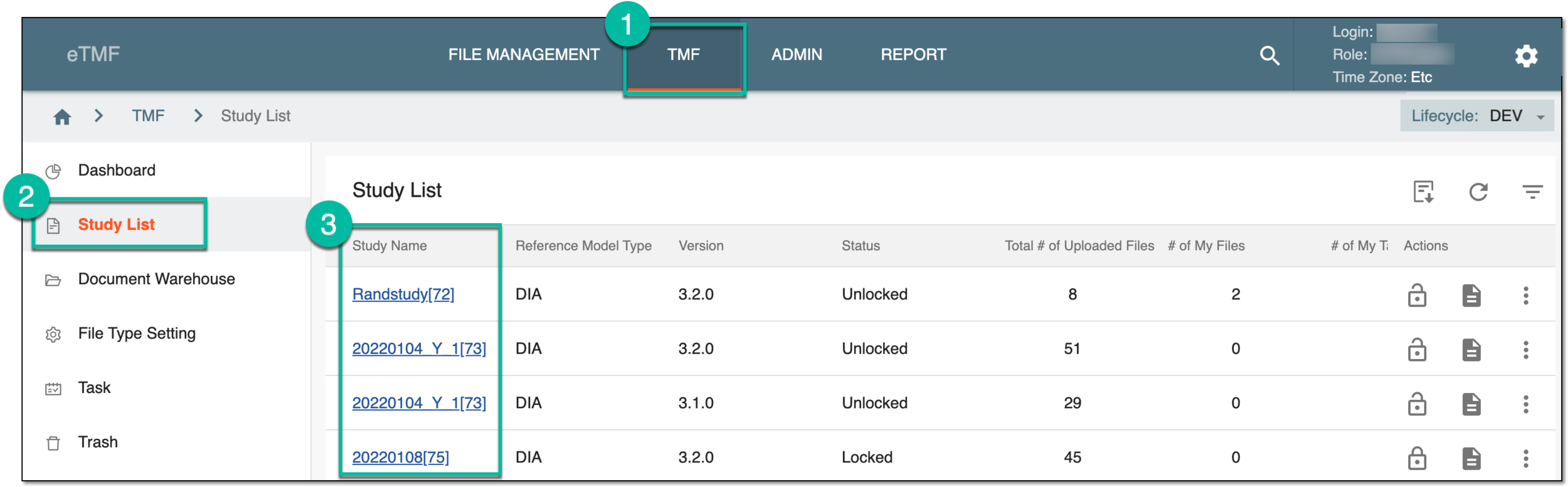 Figure 1. Accessing dashboards
-
On the page that opens, in the left pane, select the Process Tracking subtab.
The Study Overview dashboard is displayed, comprising the following two tabs, which present the milestone and placeholder data in the most detail.