Review action item queries
In CTMS, you can review and analyze all the queries opened on an action item data to raise questions, request clarification, or highlight concerns related to the information entered. This can help data managers (DM) and clinical research coordinators (CRC) to carefully analyze the queries generated during the monitoring visit process.
-
Access the study management page in one of the following ways:
-
In the CTMS application header, select the DASHBOARD tab and then select the study dashboard of your interest.
 Figure 1. Accessing study management from dashboard
-
In the CTMS application header, select the STUDY MANAGEMENT tab. Then from the Study Data List table, select the study name of your interest.
 Figure 2. Accessing study management from study data list
-
-
On the study management page that opens, from the left pane, select Query Report > Action Item Queries.
-
On the Action Item Queries page that opens, review the details of all the queries opened on the action items of a monitoring visit. The details of all the report columns are explained in the following table.
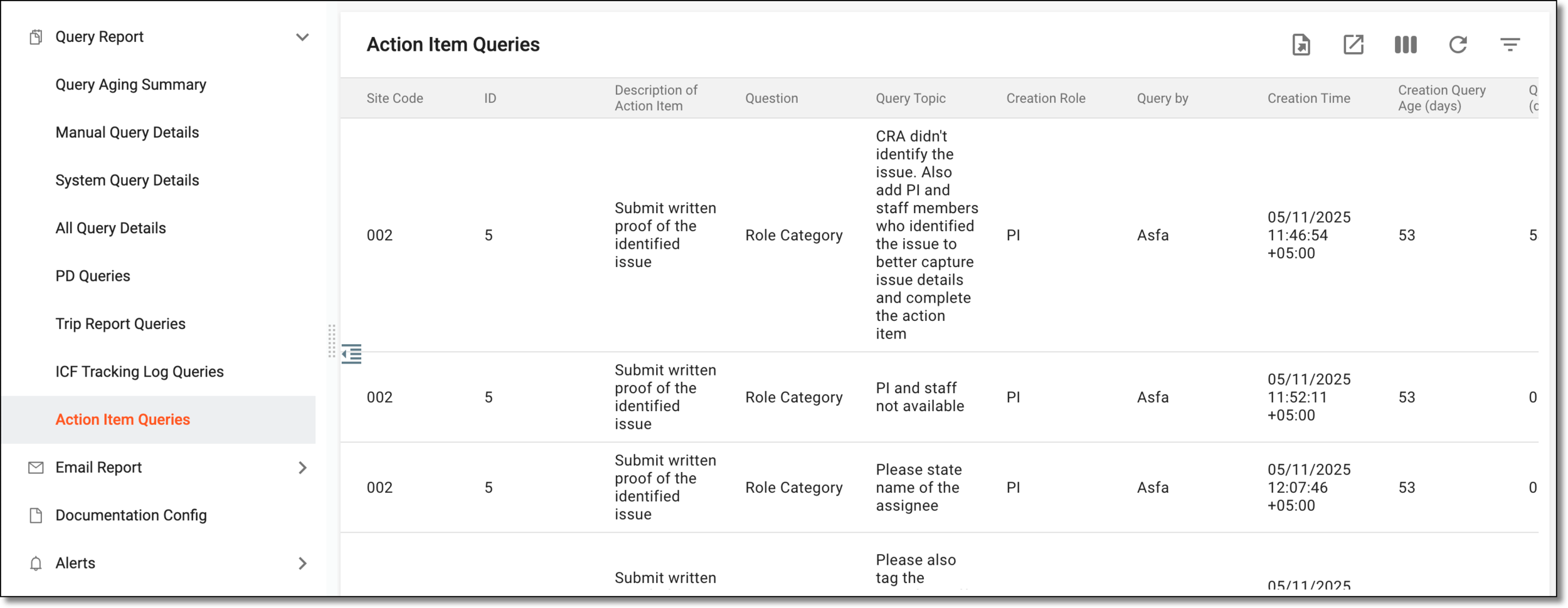 Figure 3. Reviewing action item queries
Column
Details
Site Code
Represents the code of the site where the data being queried has been collected.
ID
Represents the ID of the action item.
Description of Action Item
Represents the meaningful description of the corresponding action item.
Question
Represents whether the action item is assigned to a role (Role Category) or a specific user (Assign to).
Query Topic
Displays the question or concern regarding the action item.
Creation Role
Represents the role of the user who created the corresponding query.
Query by
Represents the user account of the user who created the query.
Creation Time
Represents the time when the query was created.
Creation Query Age (days)
Represents the number of days since the query was created.
Query Age (days)
Represents the number of days since the query was assigned to the responsible user.
Assign to
Represents whether the query is assigned to Role or Assignee.
Role
Represents the role of the user who is responsible for the resolution of the query.
Assignee
Represents the name of the user who is dealing with the action item raised in the query.
Query Status
Represents the current status of the action item query.
Overdue
Represents whether the action item query is overdue or not.
Final Reply Text
Represents the last response text of the responsible user of the query.
Final Reply Time
Represents the date and time at which the last response is added by the responsible user of the query.
Final Reply by
Represents the name of the user who last responded to the query.
Closed Time
Represents the time when the query was closed.
Closed by
Represents the name of the user who closed the query.
You have reviewed the details of all action item queries in CTMS.