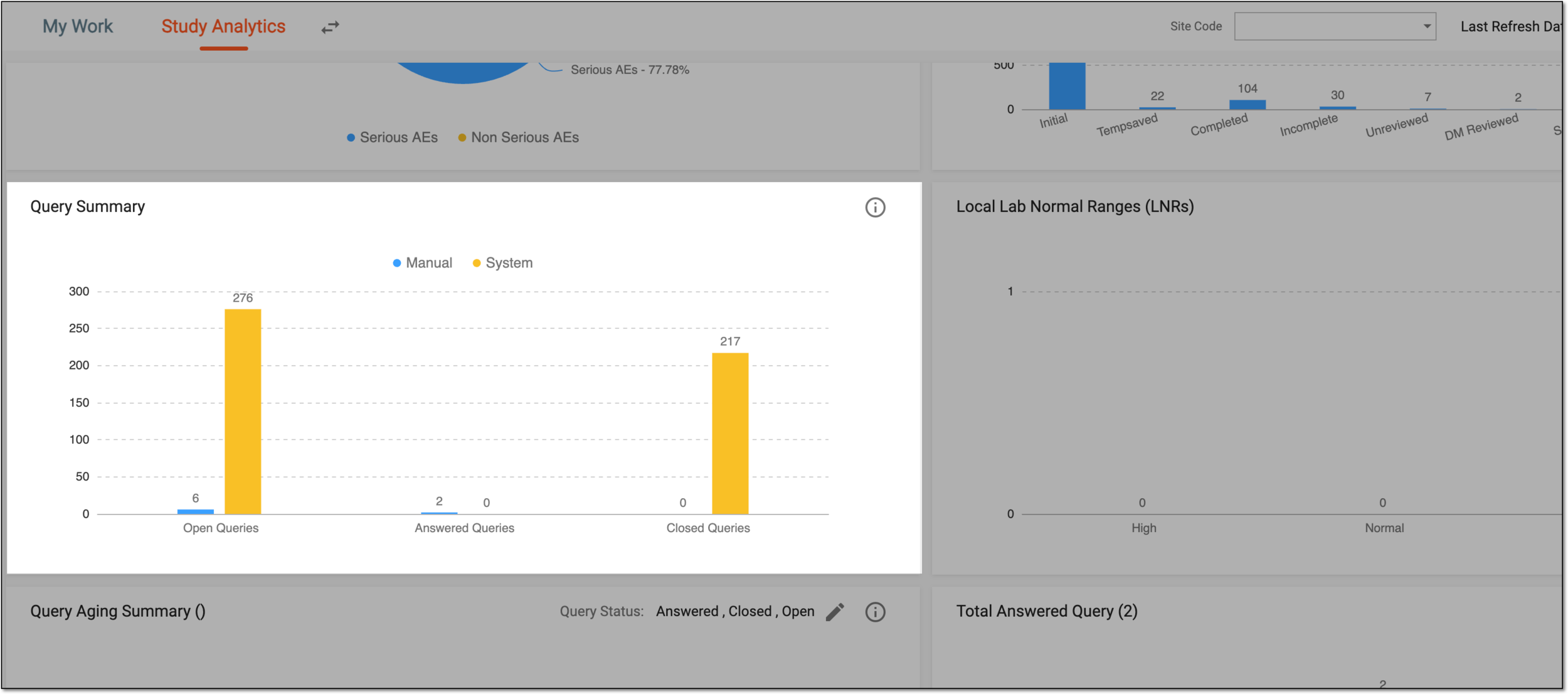
Query summary
In the Study Analytics dashboard, you are provided with multiple charts to get a quick insight into the current state of the EDC data and processes going on. The Query Summary bar chart is one of such charts displayed in the dashboard that captures all the system and manual queries that are opened, answered, and closed.
The system queries are automatically generated by the system when an eCRF has wrong or missing information. On the contrary, manual queries can be generated by a system user on any specific data item of a form (eCRF) on which they require assistance from a colleague (data manager (DM), principal investigator (PI), or others).
For example, while recording the adverse events of a subject, if Death is selected for the Serious Criteria field, but in the Outcome field, Death Related to Adverse Event is not selected, then upon saving the form (eCRF), the system generates the following query: Death should be checked when Outcome is Death Related to Adverse Event, or Death should not be checked when Outcome is not Death Related to Adverse Event. Please correct to clarify.
Similarly, while adding the adverse events records, you can generate a manual query for the DM to review the form or add information in a specific data field of a form.
This bar chart is updated in real-time, that is as soon as a query is generated (manual or system) or is answered, closed, and so on, then the count of the respective bar is updated in the chart.