Delete monitoring visit
A monitoring visit refers to an activity when a monitor, usually a clinical research associate (CRA), visits sites to review and verify study-related activities, including data collection, patient safety, and adherence to the study protocol. The monitor also checks that the study is conducted in compliance with relevant regulatory requirements and GCP guidelines. You can delete planned monitoring visits that no longer need to be in the CTMS system.
Important
Note that you can delete only the planned visits that are inactivated.
-
Access the study management page in one of the following ways:
-
In the CTMS application header, select the DASHBOARD tab and then select the study dashboard of your interest.
 Figure 1. Accessing study management from dashboard
-
In the CTMS application header, select the STUDY MANAGEMENT tab. Then from the Study Data List table, select the study name of your interest.
 Figure 2. Accessing study management from study data list
-
-
On the study page that opens, in the left pane, expand Monitoring and select Monitoring Visit.
-
In the Monitoring Visit table that appears, next to the needed monitoring visit, select More
 > Delete
  .
.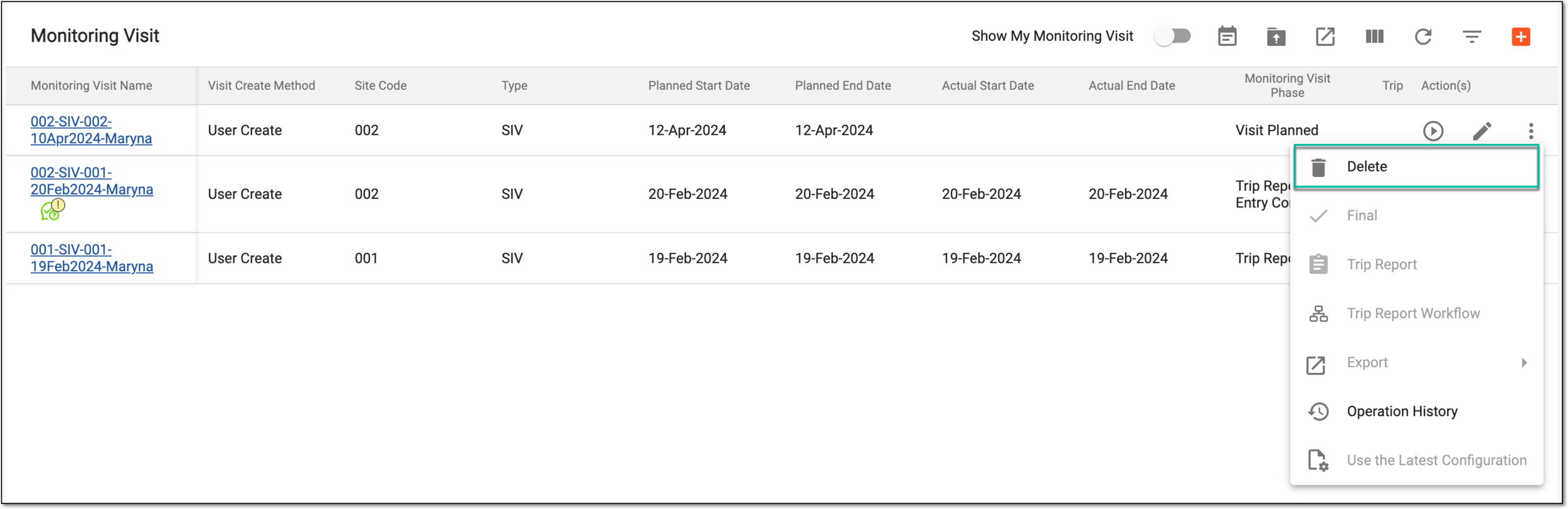 Figure 3. Deleting monitoring visit
-
In the Reason dialog that appears, enter the reason why the monitoring visit is being deleted from the system and then select
 .
.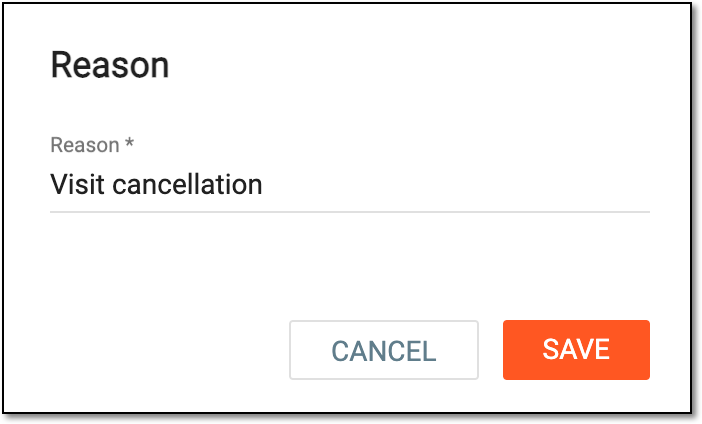 Figure 4. Providing reason for deleting monitoring visit
Once done, the monitoring visit becomes deleted. You can now proceed to creating a new monitoring visit if needed.