View script-generated report data
Script-generated reports are configured to extract data from eTMF files and provide a convenient table-view data representation in CTMS. The data extraction is performed according to your configurations from the respective uploaded R script, hence the name—script-generated reports. This functionality might become useful for sponsors who use an external EDC system and want to extract the data from there and review it via eClinical CTMS.
Once the report is configured and the script is run either by the system or manually by the user, the retrieved data can be viewed in CTMS.
Important
The following instructions are applicable for all reports except for the key risk indicators (KRI). To view the extracted KRI data, go to the RBM module of CTMS and follow the instructions of the View KRI statistics section.
-
Access the study management page in one of the following ways:
-
In the CTMS application header, select the DASHBOARD tab and then select the study dashboard of your interest.
 Figure 1. Accessing study management from dashboard
-
In the CTMS application header, select the STUDY MANAGEMENT tab. Then from the Study Data List table, select the study name of your interest.
 Figure 2. Accessing study management from study data list
-
-
On the page that opens, from the left pane, select Script-generated Reports and in the expanded menu, select the report you want to view.
-
In the table that appears, view your report data.
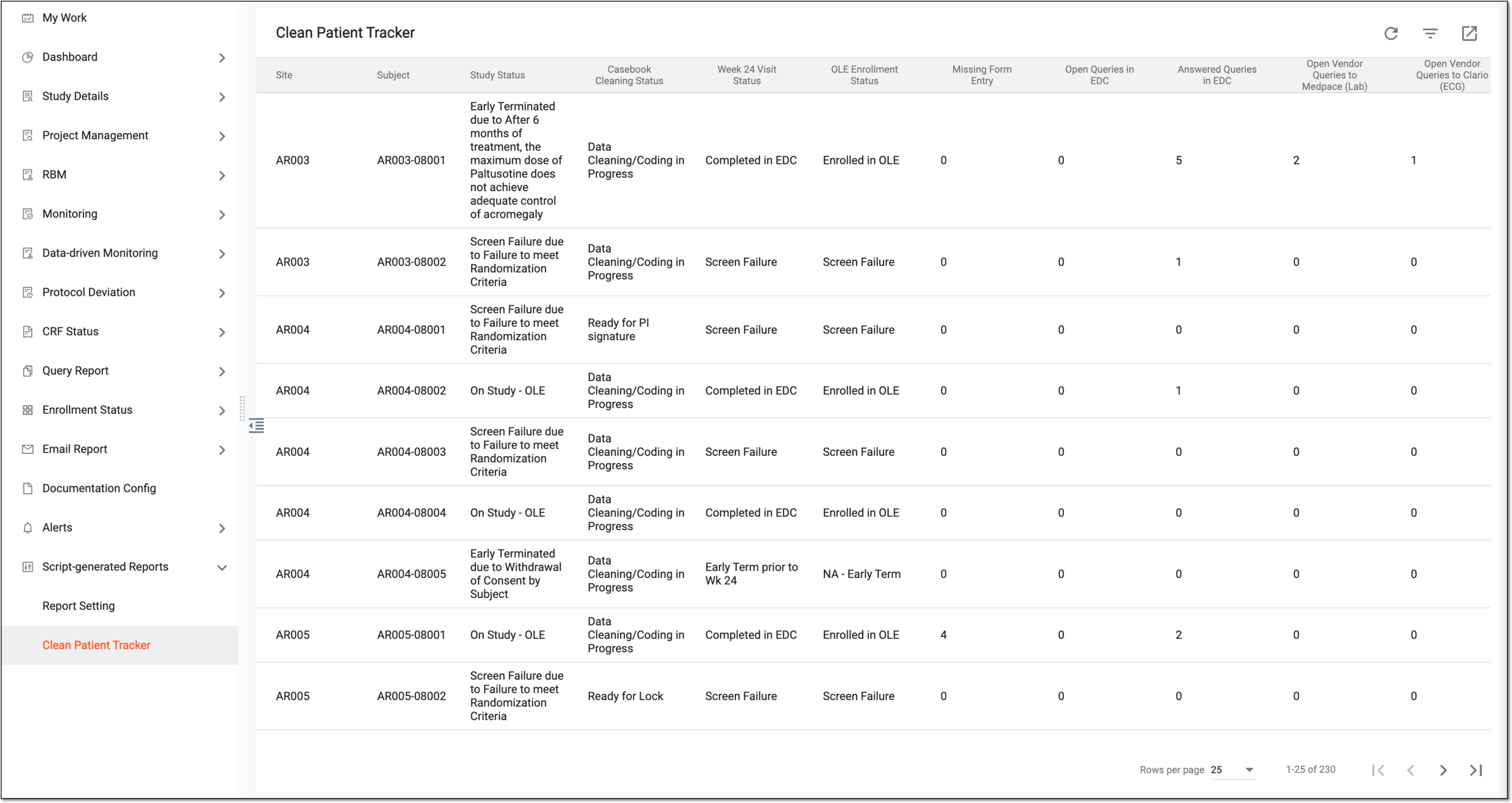 Figure 3. Viewing script-generated report data
You have viewed the script-generated report data.