Activate/Inactivate shipment alert
A shipment refers to an action of transporting items (drugs) between depots and sites. A shipment alert is a customizable notification mechanism that generates an email to inform relevant parties about the details requested for a shipment when a certain shipment transaction is processed.
The purpose of a shipment alert is to notify the responsible IWRS users about shipment-related transactions promptly. By default, the created shipment alerts are active and start triggering immediately. However, they can be inactivated to postpone or temporarily halt notifications on certain transaction types or to some recipients.
-
In the IWRS application header, select the ALERT tab.
-
In the left pane of the page that appears, select Shipment Alert.
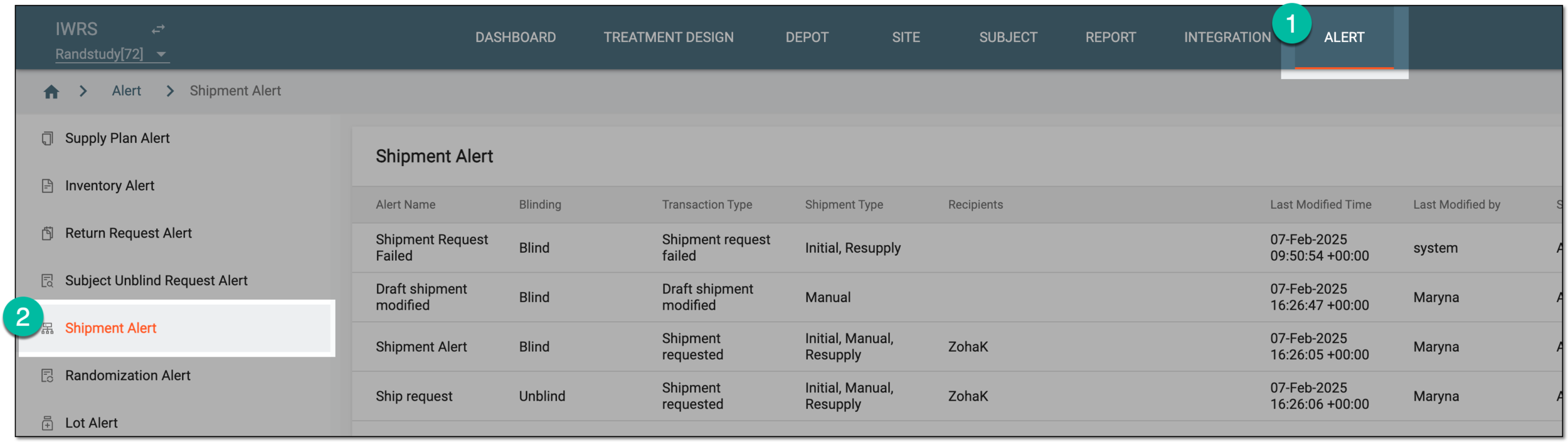 Figure 1. Accessing shipment alert setting
-
In the Shipment Alert table that appears, next to the shipment alert you want to activate or deactivate, select Activate
 or Inactivate
  , respectively.
 Figure 2. Activating and inactivating shipment alert
Once selected, the shipment alert is activated or inactivated. If deactivated, the recipients stop getting the alert email when the set shipment transaction occurs until activated again.