Edit details for marketing authorization holder/applicant
In pharmacovigilance, the Marketing Authorization Holder (MAH) refers to the entity that holds the marketing authorization or license for a pharmaceutical product. Until the authorization is obtained, the entity is considered a marketing authorization applicant. Once you have configured the needed marketing authorization holder or applicant record in the system, you might need to update some details for it, for instance, change the telephone number or address.
Important
The action availability for the marketing authorization holder or applicant is coordinated by the workflow configured for your study by the EDETEK administrator. If the editing is not available for your record in its current status, consider returning its route to the Draft state.
-
In the PV application header, select the CONFIGURATION tab.
-
On the page that opens, from the left pane, select Applicant / Holder.
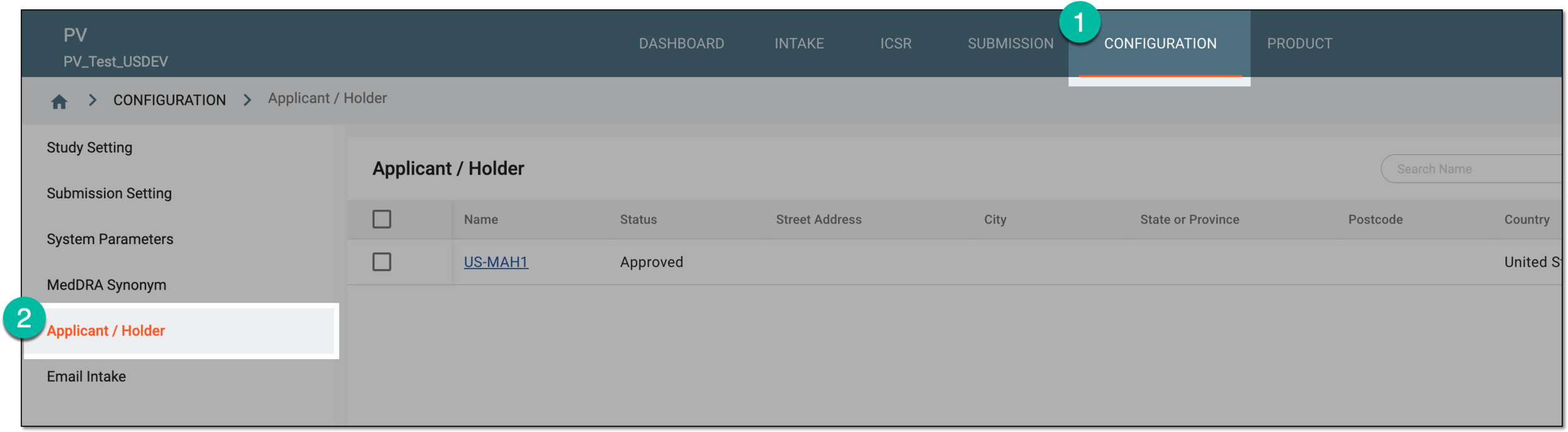 Figure 1. Accessing applicant and holder configuration
-
In the Applicant / Holder table that appears, locate the record you want to edit and next to it, from the Actions column, select Edit
 .
. Figure 2. Selecting option to edit marketing authorization holder or applicant
-
In the form that opens, update the available fields as needed. These fields are identical to the ones explained in the table of the Configure marketing authorization holder/applicant section.
 Figure 3. Editing details for marketing authorization holder or applicant
-
Select
 to save the implemented changes.
Once saved, the details of the marketing authorization holder or applicant are updated.