Activate MedDRA synonym
The Activate MedDRA synonym feature is a useful option in the PV > MedDRA Synonym module that allows you to activate an existing MedDRA synonym that has been previously inactivated. This can be necessary when a previously inactive synonym becomes relevant again or when an active synonym has been mistakenly made inactive.
-
In the PV application header, select the CONFIGURATION tab.
-
In the left pane, select MedDRA Synonym.
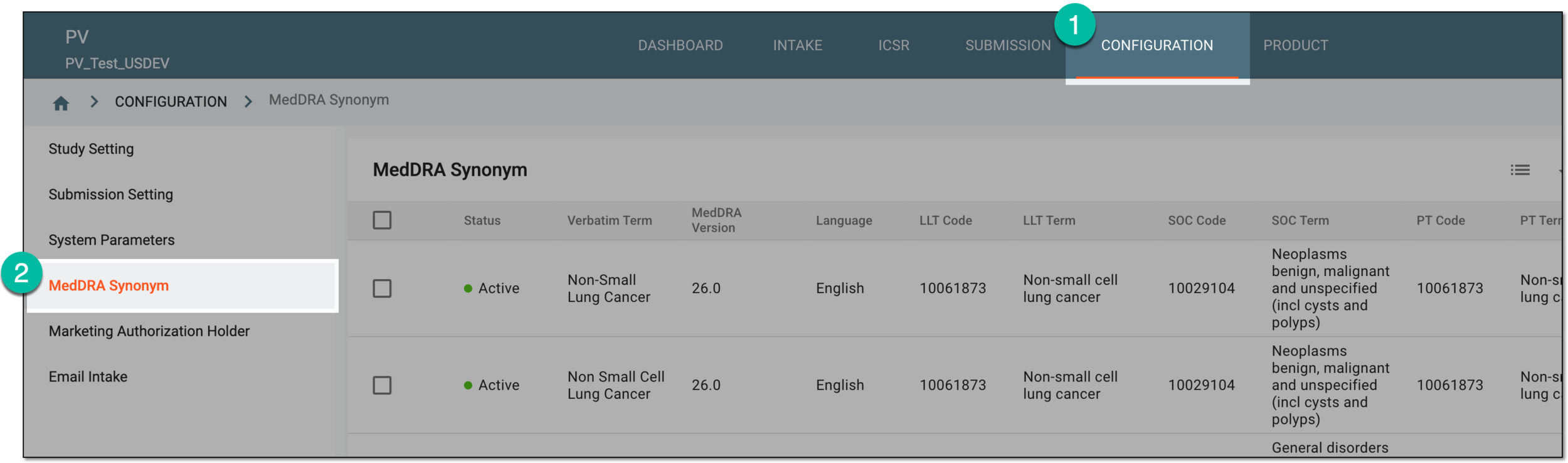 Figure 1. Accessing MedDRA synonym configuration
-
On the MedDRA Synonym table that opens, go to the synonym you need to activate and in the Actions column next to it, select Activate
 .
. Figure 2. Selecting to activate synonym
Tip
Inactive synonyms are marked with a red circle
 .
. -
If the PV application detects similar synonym records, it prompts you to inactivate them first (this is done to ensure that only the most relevant and up-to-date MedDRA synonyms are kept active).
In this case, in the Confirm dialog that opens, confirm the action by selecting
 .
. Figure 3. Confirming activation
The MedDRA synonym has been activated. You can now use it to describe various data in the PV system, such as adverse effects (AEs), medical conditions, indications, medical and surgical procedures, and more.