Export source data from execution history
Data validation refers to the process of ensuring the accuracy, reliability, and integrity of CRF data collected during the study. It involves a series of checks and procedures that aim to identify and resolve data inconsistencies. The importance of data validation lies in its role in maintaining the scientific validity and credibility of the study results. By ensuring the quality of the data, researchers can have confidence in the findings and draw accurate conclusions, which ultimately impacts patient safety and the decision-making process for regulatory authorities.
After each time the data validation is executed, a ZIP file containing the source data is generated automatically. This source data is the data that has been entered in all CRFs in EDC and to which the validation rules have been applied during the data validation process. You can download this ZIP file to your computer so you can verify what raw data exactly has been run through data validation rules.
-
In the EDC application header, select the STUDY INFO tab.
-
In the left pane of the page that opens, expand Data Validation and select the Validation List tab.
-
From the workspace toolbar of the Validation List table that appears, select History
 .
. Figure 1. Selecting History option
-
In the Execute History dialog that appears, next to the source data file that you want to download, select Export
 .
.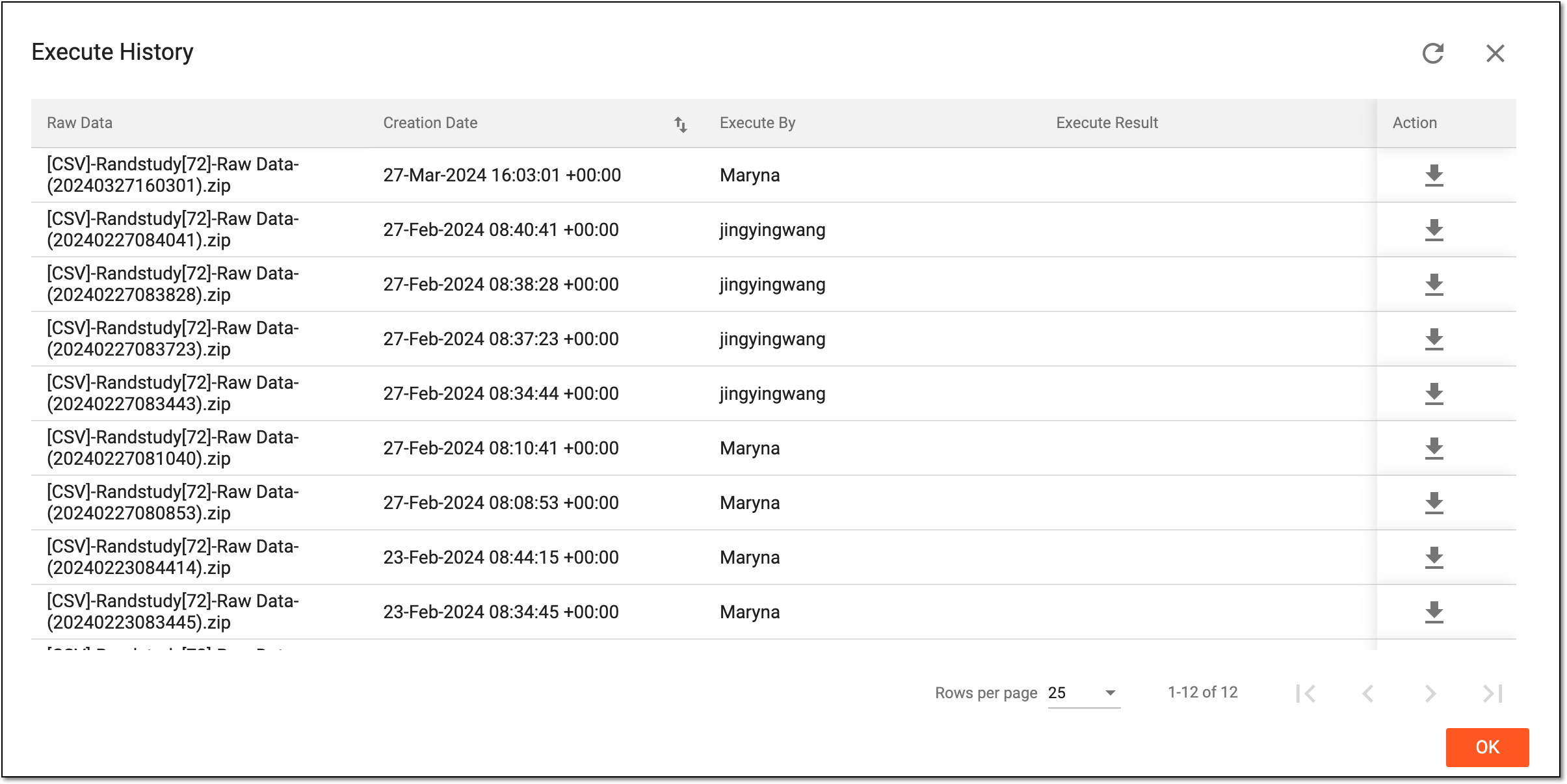 Figure 2. Exporting source data
Once exported, the source data file is downloaded to your computer. You can now work with this file offline.