Apply latest monitoring visit configuration
A monitoring visit refers to an activity when a monitor, usually a clinical research associate (CRA), visits sites to review and verify study-related activities, including data collection, patient safety, and adherence to the study protocol. The monitor also checks that the study is conducted in compliance with relevant regulatory requirements and GCP guidelines.
The monitoring configuration may change due to new study requirements or site monitoring protocols, thus affecting monitoring visits that have been manually created based on this configuration. For such monitoring visits, you can apply the new configuration to ensure they inherit the latest updates.
For example, if the monitoring configuration has been changed to allow the editing of monitoring visit names, you need to apply the latest configuration to the monitoring visits whose names you want to be able to update.
-
Access the study management page in one of the following ways:
-
In the CTMS application header, select the DASHBOARD tab and then select the study dashboard of your interest.
 Figure 1. Accessing study management from dashboard
-
In the CTMS application header, select the STUDY MANAGEMENT tab. Then from the Study Data List table, select the study name of your interest.
 Figure 2. Accessing study management from study data list
-
-
On the study page that opens, in the left pane, select Monitoring > Monitoring Visit.
-
In the Monitoring Visit table that appears, next to the needed monitoring visit, select More
 > Use the Latest Configuration
  .
.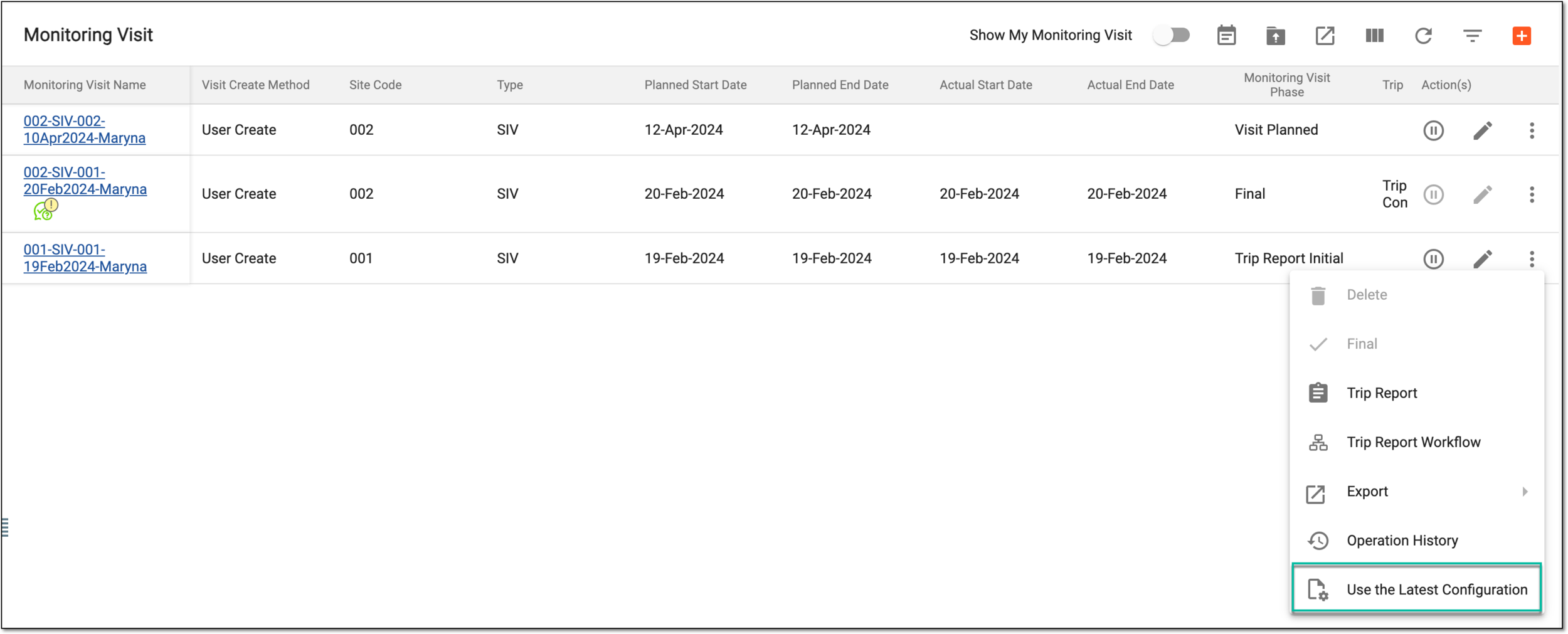 Figure 3. Applying latest configuration
Once selected, the latest configuration is applied to the monitoring visit, thus inheriting the latest monitoring configuration updates.