Review ICF tracking log template change history
ICF tracking log is a functionality used to track the distribution, collection, and status of Informed Consent Forms (ICFs) from participants in the trial. It is a management tool that ensures proper documentation and completion of all steps related to informed consent throughout the trial process.
To configure proper tracking of ICF completion, you need to select one of the previously configured ICF tracking log templates to associate it with your study. In the course of a trial, to satisfy the evolving needs, you might need to change the template you are using for the ICF tracking log or upgrade the existing one to the latest version. For traceability and compliance, all such changes are recorded by the CTMS system and can be easily traced by reviewing the operation history.
-
Access the study management page in one of the following ways:
-
In the CTMS application header, select the DASHBOARD tab and then select the study dashboard of your interest.
 Figure 1. Accessing study management from dashboard
-
In the CTMS application header, select the STUDY MANAGEMENT tab. Then from the Study Data List table, select the study name of your interest.
 Figure 2. Accessing study management from study data list
-
-
On the study management page that opens, from the left pane, select ICF > ICF Tracking Log Setting.
-
On the ICF Tracking Log Setting page that opens, go to the Operation History tab and review the complete log of changes.
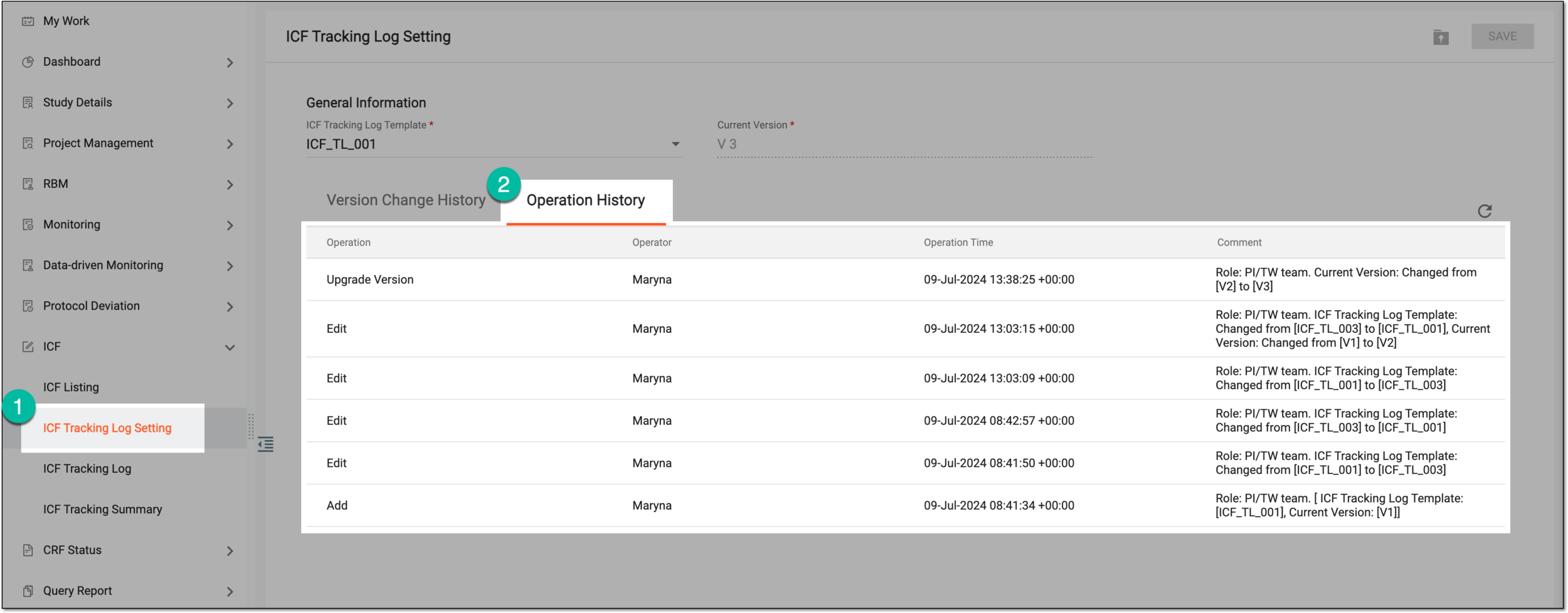 Figure 3. Reviewing ICF tracking log setting history
You have reviewed the ICF tracking log template change history.