Introduction to PV
Pharmacovigilance (PV) is a unified, intelligently automated, end-to-end application on the eClinical platform that helps customer safety teams save time, achieve scalable compliance, and make better decisions.
PV is designed according to the latest ICH E2B (R3) standard. It follows the FDA, EMA, NMPA, and other regional specifications that enable your team to collect and process safety data efficiently from clinical trials, post-marketing, literature, and so on.
The application supports the Medical Dictionary for Regulatory Activities (MedDRA) and the Unified Code for Units of Measure (UCUM). It also provides a global regulatory electronic submission of Individual Case Safety Reports (ICSR) through EDI Gateway and automatically generates reports, including CIOMS-I and MedWatch 3500A.
The application is fully integrated with EDC and relies on other eClinical applications, such as ADMIN and CTMS.
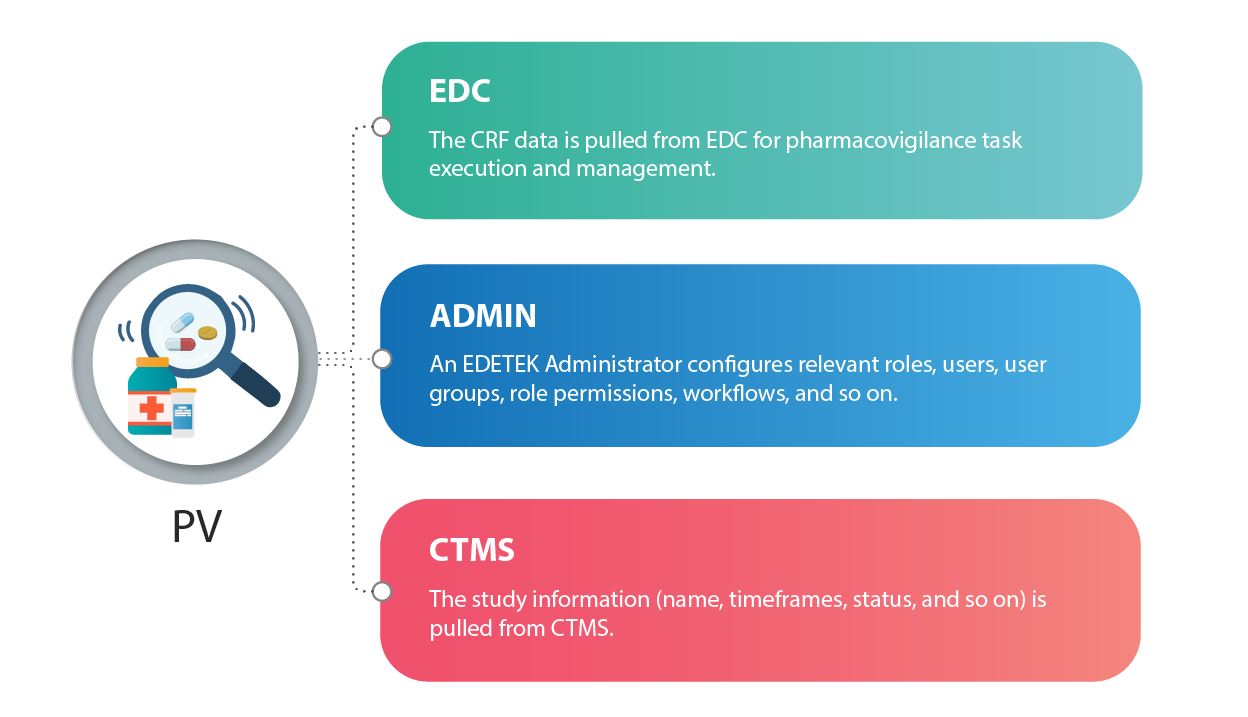
PV is fully integrated with EDC and relies on other eClinical applications, such as ADMIN and CTMS. The basic relations between PV and other applications are depicted in the following schema.
-
EDC: the capture of data, which is the object of the pharmacovigilance processes, occurs in the EDC application. Thus, PV is fully integrated with the EDC application through the Safety Gateway feature of EDC to extract all the required data. For more details, see the PV integration with EDC section.
-
ADMIN: the configuration of relevant roles, users, user groups, role permissions, workflows, and so on has to be completed by EDETEK administrator according to customer requirements.
-
CTMS: the maintenance of study information is achieved through the CTMS application. PV pulls all the data needed for the study (such as its name, start/end dates, status, and so on) from CTMS.
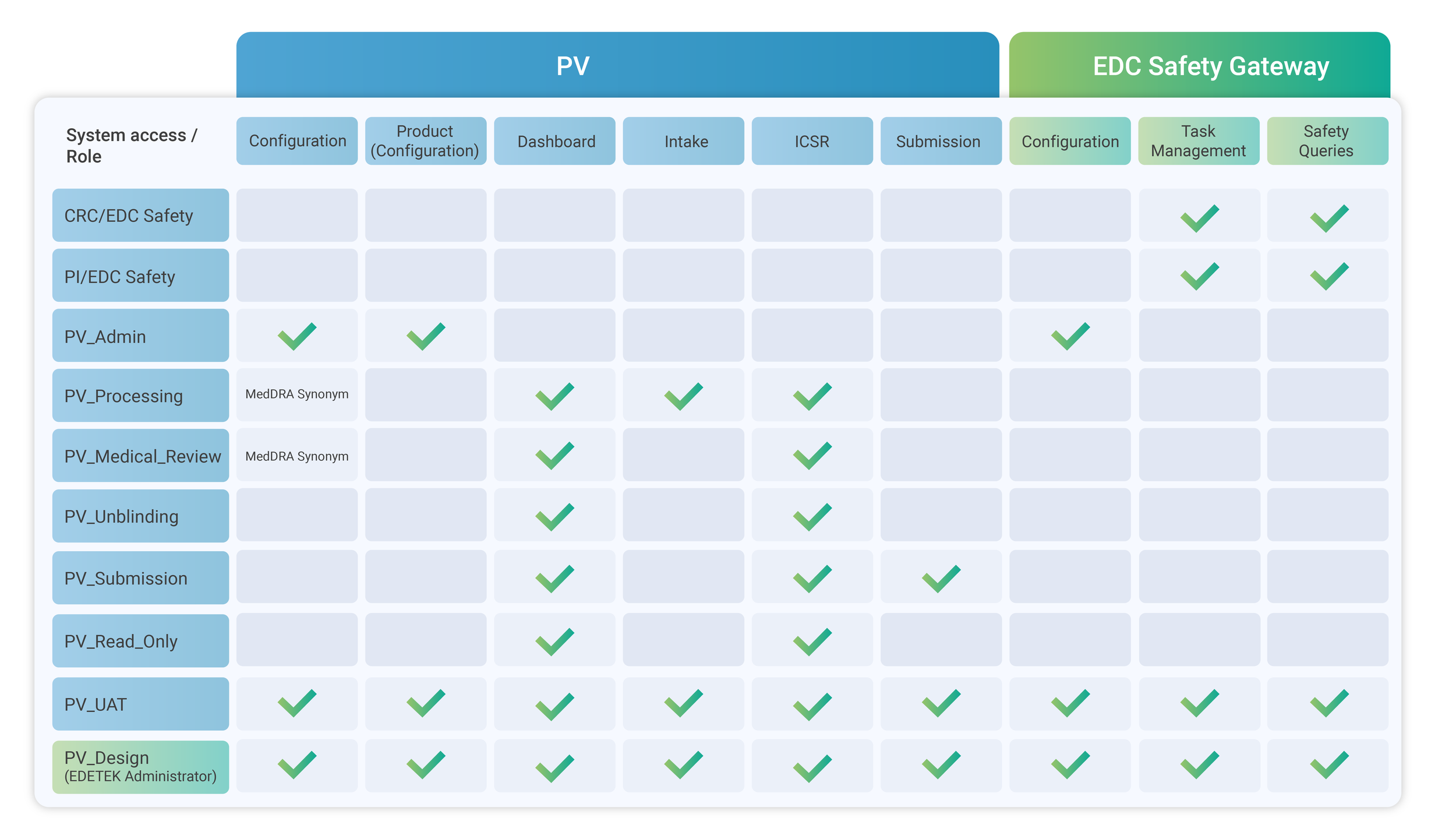
In the PV application, your access to the available features and data depends on the user role assigned to you by the EDETEK administrator. Here, you can find the recommended set of user roles to be configured in PV.
Tip
Recommended here means that these roles are configured by default and can be used as they are. In addition to/instead of these roles, each company can create/request the creation of its user roles with different access privileges per its business needs.
-
CRC/EDC Safety and PI/EDC Safety are roles given to an EDC user who works on a site with subjects and is responsible for entering data or overseeing the data entry, and sending safety reports to PV. With this role, you can create and manage tasks for sending safety reports to PV and address safety queries under the EDC > SAFETY GATEWAY module.
-
PV_Admin is a role given to a PV user who is responsible for the configuration of the SAFETY GATEWAY module in EDC as well as configuring study details, submission setting, system parameters, MedDRA synonym base, marketing authorization holder (MAH), and medicinal products and their licenses in PV.
-
PV_Processing is a role given to a PV user who is responsible for reviewing incoming data from EDC, managing case details, and processing ICSRs, and can view the MedDRA synonyms base.
-
PV_Medical_Review is a role given to a PV user who performs medical reviews for ICSRs and can view the MedDRA synonyms base.
-
PV_Unblinding is a role given to a PV user who is entitled to access sensitive data to unblind the blinded information for blinded studies.
-
PV_Submission is a role given to a PV user who is responsible for ICSR submission.
-
PV_Read_Only is a role given to a PV user to grant them view-only access and the ability to generate reports or listings as well.
-
PV_UAT is a role given to a PV user who has access to configurations and all operational permits used only for testing purposes in the UAT lifecycle.
-
PV_Design is a role given to the EDETEK administrator only for configuration and management purposes.