Dashboard
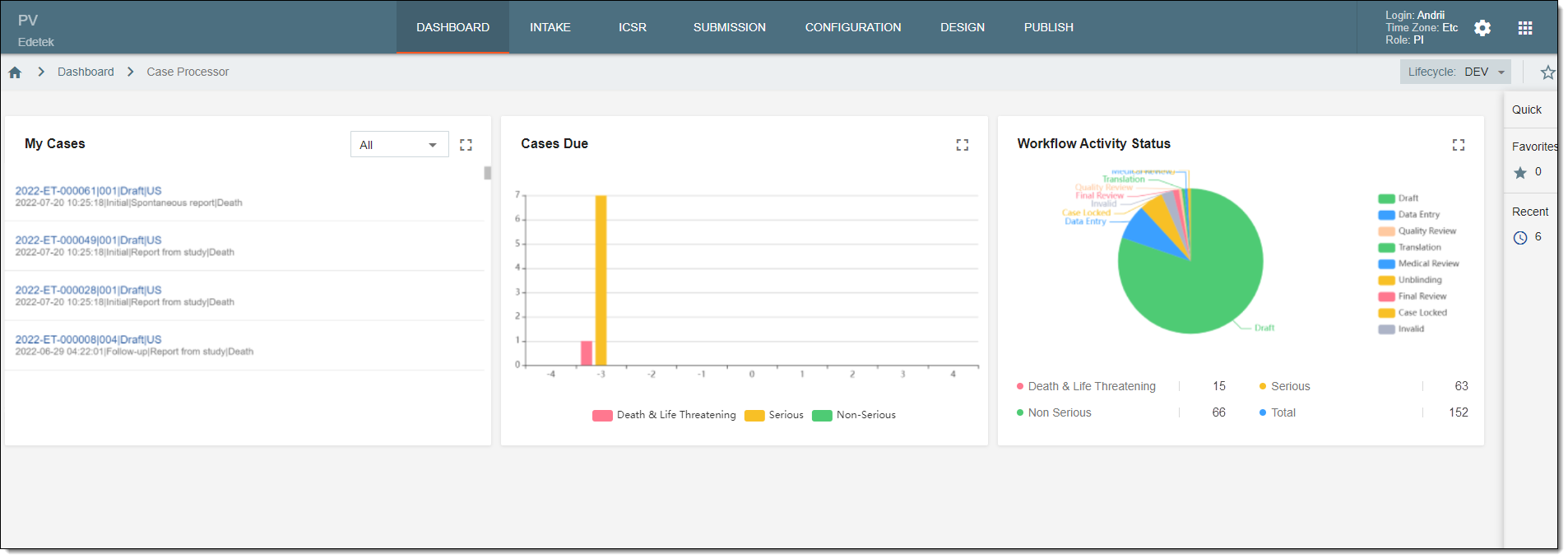
In PV, the DASHBOARD tab offers the statistical data on the cases (ICSRs) assigned to you, their due dates, and workflow statistics through the following blocks of charts:
Tip
In My Cases and Cases Due, ICSRs with the Case Archived and Invalid workflow statuses are not counted.
The dashboard statistics only include the cases that have no associated study yet or belong to the studies for which you have access permission granted via ADMIN.
-
My Cases. This block lists the cases that are assigned to the currently logged-in user. All the cases are sorted by seriousness: Death, Life Threatening, Serious, and Non-Serious. The name of each case consists of the following information: case number, case version, case status, case country, latest received date, whether the case is initial or a follow-up, type of report, and seriousness of the case. Each case is hyperlinked so you can select them to go to the respective ICSR management page that opens in a new browser tab.
-
Cases Due. This chart shows statistical data on the due date of all cases. All the cases are categorized by seriousness: Death & Life Threatening, Serious, and Non-Serious.
-
Workflow Activity Status. This chart shows the statistical data on the ICSR workflow statuses of all cases. All the cases are categorized by seriousness: Death & Life Threatening, Serious, and Non-Serious. The total number of cases is indicated as well. The standard ICSR workflow has the following statuses: Draft, Data Entry, Quality Review, Translation, Medical Review, Unblinding, Final Review, Case Submission, Case Archived, and Invalid.